
Game Overview
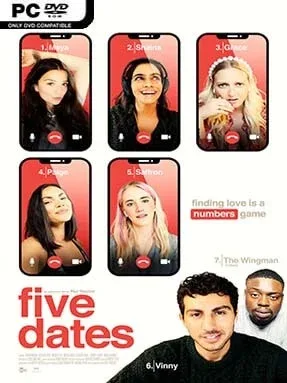
Lockdown turns an ordinary London flat into the stage for a surprisingly tense romantic experiment, where every awkward pause, joke, and personal question can make or break a first impression. Five Dates is an interactive full-motion-video drama following Vinny, a young man trying online dating for the first time during the COVID-19 pandemic. Rather than treating romance as a simple route to a “correct” ending, it captures the uncertainty of meeting strangers through a screen, balancing playful banter with vulnerable conversations about work, family, identity, and expectations. The tone is light and personable on the surface, but the choices can lead to genuinely uncomfortable or heartfelt moments.
Players guide Vinny through video calls with five possible matches, selecting dialogue responses, deciding how direct or guarded he should be, and reacting to the women’s personalities in real time. Conversations branch constantly, so a throwaway answer may unlock a deeper topic, cause a date to lose interest, or shape who Vinny speaks with next. There are no reflex challenges or traditional exploration systems; the gameplay is about reading the room, remembering what people say, and choosing whether Vinny acts confidently, sincerely, cautiously, or selfishly. Multiple routes, relationship outcomes, and unseen scenes encourage repeat playthroughs, especially for players who want to test how dramatically a different conversational approach changes the story.
Its strongest feature is the believable FMV presentation, with a capable cast that includes Mandip Gill and Georgia Hirst, making the calls feel closer to a small contemporary drama than a conventional visual novel. The pandemic setting also gives the premise an unusual specificity: the distance and technical limits of video dating become part of the emotional stakes rather than background decoration. Five Dates suits players who enjoy choice-driven stories such as Late Shift, The Complex, or Telltale-style dialogue sequences, though it is more intimate and conversation-focused than those games. Anyone looking for action or deep simulation should look elsewhere, but fans of relationship dramas and replayable branching narratives will find plenty to unpack.
Installation
- Click the green button below to be redirected to UploadHaven.
- Wait 15 seconds, then hit “Free Download.” (Free downloads may be slower — upgrade to UploadHaven Pro for faster speeds.)
- Once downloaded, right-click the .zip file and choose “Extract to Five Dates.” (You’ll need 7-Zip for this.)
- Open the extracted folder and run the game as administrator.
- Enjoy! 🎮 If you see missing DLL errors, check the <strong>_Redist</strong> folder inside and install what’s needed.
System Requirements
- OS: Windows
- Storage: 9.86 GB available space
- License: Free
Setup Guide & Troubleshooting
How do I fix missing DLL errors for Five Dates (v2023.04.24)?
After extracting Five Dates (v2023.04.24), navigate to the _Redist or _CommonRedist folder inside the game directory and install DirectX, Vcredist, and any other dependencies included.
What should I do if the downloaded file is corrupted?
The full archive is 9.86 GB — make sure your download completed fully before extracting. Use 7-Zip to extract the files. If you still see a "file corrupted" error, re-download and try again.
Why should I run the game as administrator?
Right-click the game executable and select "Run as Administrator" to avoid save file issues and permission errors. This is especially important on the first launch.
How do I update my GPU drivers for this game?
Update your NVIDIA or AMD drivers to the latest version for the best performance and compatibility.
The game won't launch — what should I try?
Try running in compatibility mode, install the latest DirectX runtime, or install the All-in-One VC Redist Package.
My antivirus is blocking the game — is it safe?
Antivirus false positives are common with pre-installed games. Temporarily pause your antivirus during extraction to prevent it from quarantining game files. You can re-enable it after the extraction completes.