
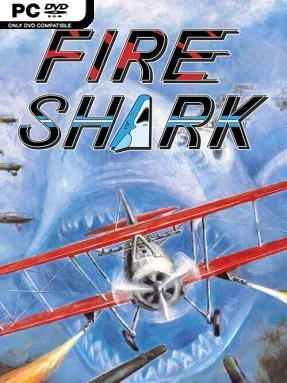
Game Overview
A blazing vertical shooter with no patience for hesitation, Fire Shark turns a lone attack helicopter into an airborne arsenal against an overwhelming mechanized enemy. Originally built for arcades by Toaplan, it delivers the kind of immediate, ruthless action that defines late-'80s shoot-'em-ups: dense bullet patterns, collapsing fortresses, armored convoys, and enormous bosses that fill the screen. Its military backdrop gives the mayhem a satisfying weight, even as the action becomes gloriously exaggerated. The mood is intense and old-school, but its colorful pixel art and explosive effects keep it from feeling grim.
Players guide their helicopter through vertically scrolling stages, weaving through enemy fire while collecting icons that improve a chosen weapon type. Homing missiles help clear swarms, machine guns offer dependable coverage, bombs erase dangerous situations, and lasers concentrate damage against tougher targets; the phoenix-like Super Fire attack is the showpiece, unleashing a huge wave of destruction when fully powered. Success depends on route awareness, careful positioning, and knowing when to spend bombs rather than gambling on a narrow dodge. Local two-player co-op lets a second pilot join the battle, while the modern release adds adjustable autofire, a forgiving Very Easy setting, extensive practice options, rewind functionality, quick saves, mirrored stages, replay capture, and responsive low-latency input.
What makes Fire Shark endure is its balance of readable arcade design and escalating pressure. Enemy formations are simple enough to understand at a glance, yet every stage steadily adds more threats and demands cleaner movement, making score chasing and single-credit clears genuinely compelling. Online leaderboards for assisted, no-assist, and single-credit runs give dedicated players a reason to keep refining their approach, while rotation and scaling options make the vertical presentation comfortable on modern displays. Fans of Truxton, Raiden, 1942, or Sky Shark find a sharp, explosive essential here, and the generous assists make it far more approachable for shmup newcomers than its arcade reputation suggests.
Screenshots
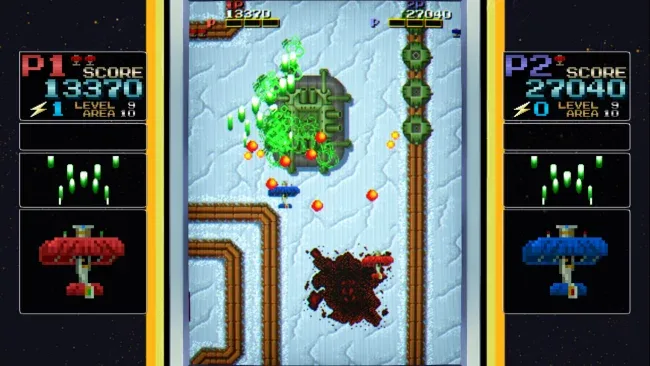
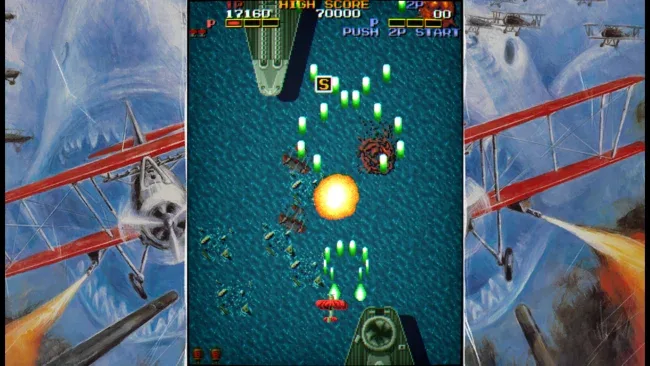
Installation
- Select the <strong>Download</strong> button at the top of this page to open UploadHaven.
- On UploadHaven, wait for any countdown, then select <strong>Free Download</strong>. Optional: UploadHaven Pro for faster downloads.
- When complete, extract the archive to a <strong>Fire Shark</strong> folder using 7-Zip.
- Open the extracted folder and start the game normally.
- For errors, check <strong>Setup Guide & Troubleshooting</strong> below. Keep your security software enabled.
System Requirements
- Requires a 64-bit processor and operating system
- Memory: 256 MB RAM
- Storage: 10 MB available space
Setup Guide & Troubleshooting
Is Fire Shark completely free?
Yes, the build we tested is free to download from UploadHaven. There's no purchase, subscription, or account requirement to play the single-player and local co-op modes.
How do I install Fire Shark?
Click the download button, wait for the UploadHaven countdown, select Free Download, then extract the 51.84 MB archive with 7-Zip. Open the extracted Fire Shark folder and launch the game executable.
Does Fire Shark support two players?
Yes. Local two-player co-op is included, so a second pilot can join on the same PC and fly alongside you through the vertical stages.
What makes Fire Shark easier than other arcade shooters?
The modern re-release adds a Very Easy setting, adjustable autofire, rewind, quick saves, and practice options. These tools let you study patterns without losing entire runs to a single mistake.
Can I run Fire Shark on a low-end PC?
Almost certainly. The archive is only 51.84 MB, and the listed requirements are a 64-bit processor, 256 MB RAM, and 10 MB of storage. Any Windows machine from the last decade should handle it.