

Game Overview
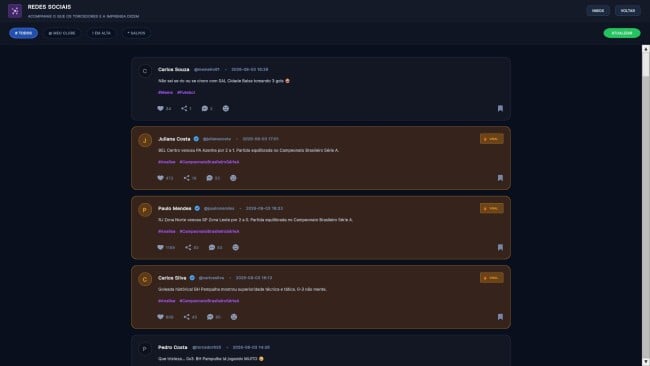
Running a football club becomes as much about balance sheets and boardroom influence as selecting a winning formation. Empire Eleven 2026 is a management simulator that puts you in charge of an entire organization, from a modest regional side to a globe-spanning football empire. Its tone is deliberate and numbers-driven rather than frantic, making room for players who enjoy planning transfers, projecting revenue, and gradually shaping a club’s identity. The focus reaches well beyond the touchline: success depends on whether your institution remains financially healthy while competing for trophies.
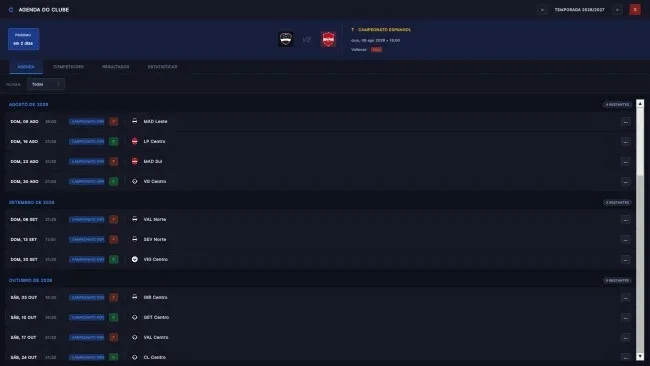
Matches play out through a dedicated 2D tactical display, where formations, player roles, and in-game decisions determine how your plans translate to the pitch. Between fixtures, you scout data for undervalued players, negotiate deals, set ticket prices, develop youth facilities, and decide whether to build around academy talent or expensive stars. Manager earnings can become investment capital, allowing you to purchase clubs, stadiums, and sponsorship interests rather than merely collecting a larger wage. Financial Fair Play, investor confidence, stakeholder expectations, and cash flow all add pressure to long-term decisions, although the overall pace is designed to reward careful strategy instead of demanding constant reactions.
The standout idea is its CEO-level ambition: multi-club ownership lets a successful save grow from managing one squad into directing a network of teams across leagues. Stadium expansion, commercial contracts, club culture, and infrastructure tie sporting performance to a broader business simulation in a way many football managers only touch on lightly. An in-game editor, custom leagues and clubs, datapacks, and a community mod hub also give dedicated players tools to reshape the database and create alternate football worlds. Fans of Football Manager who spend as much time studying finances and transfers as tactics should find the premise especially appealing, while newcomers may appreciate the cleaner, more relaxed presentation—provided they are ready for a feature set built by a small independent team and likely to evolve over time.
Screenshots
Installation
- Click the green button below to be redirected to UploadHaven.
- Wait 15 seconds, then hit “Free Download.” (Free downloads may be slower — upgrade to UploadHaven Pro for faster speeds.)
- Once downloaded, right-click the .zip file and choose “Extract to Empire Eleven 2026.” (You’ll need 7-Zip for this.)
- Open the extracted folder and run the game as administrator.
- Enjoy! 🎮 If you see missing DLL errors, check the <strong>_Redist</strong> folder inside and install what’s needed.
System Requirements
- OS: Windows 10 64-bit or higher
- Processor: Intel Core i3 4th Gen or higher | AMD Ryzen 3 1200 or higher
- Memory: 8 GB RAM
- Graphics: Intel HD 530 or GTX 750 Ti
- Network: Broadband Internet connection
- Storage: 10 GB available space
- Additional Notes: SSD is recommended
Setup Guide & Troubleshooting
How do I fix missing DLL errors for Empire Eleven 2026 (v1.0.13)?
After extracting Empire Eleven 2026 (v1.0.13), navigate to the _Redist or _CommonRedist folder inside the game directory and install DirectX, Vcredist, and any other dependencies included.
What should I do if the downloaded file is corrupted?
The full archive is 868.08 MB — make sure your download completed fully before extracting. Use 7-Zip to extract the files. If you still see a "file corrupted" error, re-download and try again.
Why should I run the game as administrator?
Right-click the game executable and select "Run as Administrator" to avoid save file issues and permission errors. This is especially important on the first launch.
How do I update my GPU drivers for this game?
Empire Eleven 2026 (v1.0.13) requires a Intel HD 530 or GTX 750 Ti or equivalent. Update your NVIDIA or AMD drivers to the latest version for the best performance.
The game won't launch — what should I try?
Try running in compatibility mode, install the latest DirectX runtime, or install the All-in-One VC Redist Package.
My antivirus is blocking the game — is it safe?
Antivirus false positives are common with pre-installed games. Temporarily pause your antivirus during extraction to prevent it from quarantining game files. You can re-enable it after the extraction completes.