
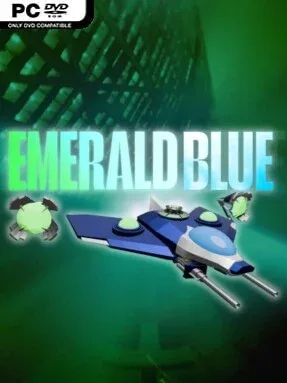
Game Overview
Sara Yong’s stolen prototype fighter turns a compact sci-fi shooter into a tense score-chasing rebellion. As an N.W.E. pilot operating on motives the story deliberately keeps obscure, she takes the Swan aircraft on a mission to erase the Emerald-Capsule, an artifact with consequences far beyond one battlefield. The tone is fast, stylish, and cryptic rather than military-simulation serious, with each encounter pushing both survival and mastery. Four focused stages keep the campaign brisk while leaving room to chase better runs and uncover the shape of Sara’s conflict.
Combat revolves around the Pierce Lance, a specialized attack used not only to destroy enemies but also to harvest the gems that fuel your score potential. Collected gems build the Emerald-Chain, so strong play means knowing when to stay aggressive, position near danger, and preserve a lucrative chain instead of simply clearing the screen as safely as possible. Power mode favors deliberate, forceful attacks, while Speed mode makes the craft more responsive and suited to players who enjoy rapid movement and split-second dodges. The Crystal Rev version refines balance and adds alternate modes, giving repeat attempts more variety for players invested in score improvement.
Emerald Blue stands out through its blend of arcade shooting and resource-minded scoring: every enemy wave is an opportunity to increase the chain, not merely an obstacle to remove. Its concise structure avoids the bloat common in modern action games, concentrating instead on route learning, mechanical precision, and the contrast between its two control styles. The mysterious narrative provides atmosphere without getting in the way of the action, while the updated modes extend its value beyond a single clear. Fans of focused indie shoot-’em-ups, especially players who enjoy refining runs in the vein of arcade bullet-hell score games, find the most to like here; newcomers can begin in Power mode, while genre veterans are likely to gravitate toward Speed.
Installation
- Click the green button below to be redirected to UploadHaven.
- Wait 15 seconds, then hit “Free Download.” (Free downloads may be slower — upgrade to UploadHaven Pro for faster speeds.)
- Once downloaded, right-click the .zip file and choose “Extract to Emerald Blue.” (You’ll need 7-Zip for this.)
- Open the extracted folder and run the game as administrator.
- Enjoy! 🎮 If you see missing DLL errors, check the <strong>_Redist</strong> folder inside and install what’s needed.
System Requirements
- OS: Windows 10 Or Newer
- Processor: Intel Core 2 Duo or newer/AMD Athlon 64 X2 or newer
- Memory: 2 GB RAM
- Graphics: Integrated graphics
- DirectX: Version 9.0
- Network: Broadband Internet connection
- Storage: 1 GB available space
- Additional Notes: Game speed is tied to FPS
Setup Guide & Troubleshooting
How do I fix missing DLL errors for Emerald Blue?
After extracting Emerald Blue, navigate to the _Redist or _CommonRedist folder inside the game directory and install DirectX, Vcredist, and any other dependencies included.
What should I do if the downloaded file is corrupted?
The full archive is 361.48 MB — make sure your download completed fully before extracting. Use 7-Zip to extract the files. If you still see a "file corrupted" error, re-download and try again.
Why should I run the game as administrator?
Right-click the game executable and select "Run as Administrator" to avoid save file issues and permission errors. This is especially important on the first launch.
How do I update my GPU drivers for this game?
Emerald Blue requires a Integrated graphics or equivalent. Update your NVIDIA or AMD drivers to the latest version for the best performance.
The game won't launch — what should I try?
This game requires Version 9.0. Try running in compatibility mode, install the latest DirectX runtime, or install the All-in-One VC Redist Package.
My antivirus is blocking the game — is it safe?
Antivirus false positives are common with pre-installed games. Temporarily pause your antivirus during extraction to prevent it from quarantining game files. You can re-enable it after the extraction completes.