
Game Overview
Elemental Connection takes a handful of colored squares and turns them into a calm but genuinely competitive abstract strategy contest. After downloading and running it on a standard Windows machine, the first thing our team noticed is how fast it gets out of your way. There's no cinematic intro, no sprawling menu tree, and no learning curve to speak of. You're on the board within seconds.
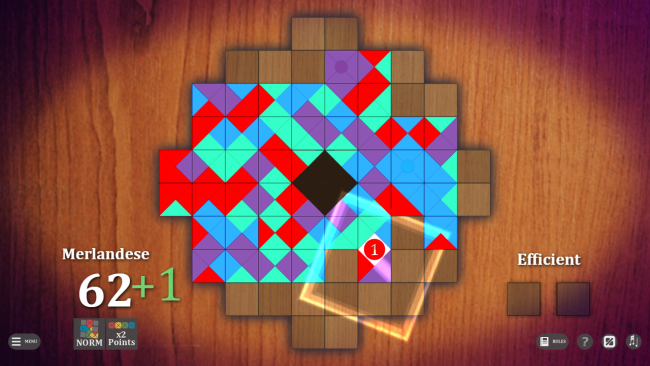
The presentation is clean and board-game-like. Vivid minimalist visuals and a smooth, understated soundtrack keep the mood welcoming rather than punishing. Beneath that relaxed surface, though, every connection you make can open a door for your opponent. That tension is the heart of the game, and it's what kept me coming back for one more round.
Matches revolve around claiming opportunities on the same growing board as an opponent. You connect tiles of matching colors while trying to secure a higher score. New squares alter the shape of the field as play continues, so a promising route can become blocked, contested, or suddenly valuable depending on how both players respond. In my experience, the board rarely plays out the same way twice, which is exactly what you want from this style of game.
Learning the basics takes little time, but strong play demands an eye for future connections, efficient scoring, and the small positional advantages that decide close rounds. Solo players can face six distinct AI personalities or tackle dedicated puzzle challenges, while online multiplayer lets two human opponents test their planning directly.
What makes Elemental Connection appealing is its commitment to elegant, readable strategy rather than complicated rules or random spectacle. Light visual customization lets players personalize the board without compromising the crisp, color-driven design. The soundtrack helps it work equally well as a focused competitive game or a low-pressure evening distraction. It carries some of the spatial tension of abstract classics such as Azul or Blokus, though its shared evolving field gives it a character of its own.
Screenshots

Installation
- Click the green download button to open UploadHaven, wait for the countdown, and select Free Download.
- Use 7-Zip to extract the 182.19 MB archive into an Elemental Connection folder.
- Open the extracted folder and start the game normally. If you hit a missing DLL error, install the bundled dependencies from the _Redist or _CommonRedist folder.
System Requirements
- OS: Windows
- Storage: 182.19 MB available space
- License: Free
Setup Guide & Troubleshooting
Is Elemental Connection completely free?
Yes. Elemental Connection is listed as a free download at 182.19 MB for Windows, with no purchase required to play.
How do I install Elemental Connection?
Click the download button to open UploadHaven, wait for any countdown, then select Free Download. Extract the archive to an Elemental Connection folder using 7-Zip, open the folder, and start the game normally.
Does Elemental Connection have multiplayer?
Yes. It supports online multiplayer for two human opponents, alongside six AI personalities and dedicated puzzle challenges for solo play.
What are the system requirements for Elemental Connection?
It targets Windows and needs a 1024×768 or better resolution in High Color mode, with roughly 200 MB of free space and a DirectSound-compatible sound card.
Is Elemental Connection safe to download?
We can't guarantee the safety of every mirror or re-upload. Keep your security software enabled, review any detection details, and avoid running flagged files unless you've verified they're false positives.