
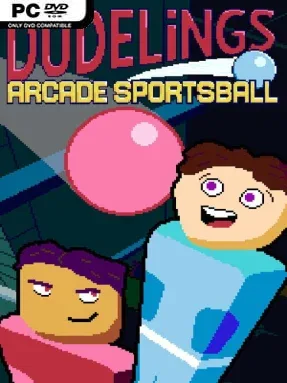
Game Overview
Arcade sports rarely get more chaotic than a match where every player is managing a tiny squad of punch-happy minions while a suddenly airborne bowling ball heads toward the net. Dudelings: Arcade Sportsball turns the simplicity of Pong into a frantic local-versus arena game, borrowing the positional scrambling of foosball and adding platform-fighter movement. Its colorful, deliberately silly presentation keeps the mood light, but the action can become surprisingly cutthroat when a single deflection decides a round. The premise is easy to grasp: claim the ball, turn it to your team’s color, and force it into the opposing goal.
Rather than controlling a full team simultaneously, each player rapidly cycles between neutral Dudelings lined along their side of the arena. The active character can jump to meet high shots, dash across the floor for a save, and punch the ball—or rivals—to interrupt an attack and create an opening. Possession is especially important because a Dudeling’s touch determines which side can score; the ball cannot simply be knocked accidentally into your own net. Matches change pace whenever pickups appear, introducing extra balls, distorted physics, or entirely different projectiles. A standard ball behaves predictably, while beach balls, balloons, and heavy bowling balls demand different positioning, timing, and defensive priorities.
What separates Dudelings from a conventional arcade sports game is its constant tug-of-war between individual movement and team-wide placement. Switching control makes every player a potential goalkeeper, striker, or last-second defender, so success comes from reading rebounds and choosing the right Dudeling rather than relying on one dominant character. Variable balls and arena-altering power-ups also make repeat matches less predictable, encouraging the sort of loud couch competition where a comfortable lead can vanish instantly. Fans of local multiplayer games such as Duck Game, TowerFall, or the more chaotic modes in Rocket League should appreciate its accessible controls and rapid rounds, while veteran competitive players can dig into the timing and positioning underneath the cartoon brawling.
Installation
- Click the green button below to be redirected to UploadHaven.
- Wait 15 seconds, then hit “Free Download.” (Free downloads may be slower — upgrade to UploadHaven Pro for faster speeds.)
- Once downloaded, right-click the .zip file and choose “Extract to Dudelings: Arcade Sportsball.” (You’ll need 7-Zip for this.)
- Open the extracted folder and run the game as administrator.
- Enjoy! 🎮 If you see missing DLL errors, check the <strong>_Redist</strong> folder inside and install what’s needed.
System Requirements
- OS: Windows 10
- Processor: AMD Ryzen/Intel Ivy Bridge or newer
- Memory: 512 MB RAM
- Graphics: Radeon HD 7000/GeForce 8 Series/Intel Ivy Bridge or newer
- Storage: 500 MB available space
Setup Guide & Troubleshooting
How do I fix missing DLL errors for Dudelings: Arcade Sportsball?
After extracting Dudelings: Arcade Sportsball, navigate to the _Redist or _CommonRedist folder inside the game directory and install DirectX, Vcredist, and any other dependencies included.
What should I do if the downloaded file is corrupted?
The full archive is 562.90 MB — make sure your download completed fully before extracting. Use 7-Zip to extract the files. If you still see a "file corrupted" error, re-download and try again.
Why should I run the game as administrator?
Right-click the game executable and select "Run as Administrator" to avoid save file issues and permission errors. This is especially important on the first launch.
How do I update my GPU drivers for this game?
Dudelings: Arcade Sportsball requires a Radeon HD 7000/GeForce 8 Series/Intel Ivy Bridge or newer or equivalent. Update your NVIDIA or AMD drivers to the latest version for the best performance.
The game won't launch — what should I try?
Try running in compatibility mode, install the latest DirectX runtime, or install the All-in-One VC Redist Package.
My antivirus is blocking the game — is it safe?
Antivirus false positives are common with pre-installed games. Temporarily pause your antivirus during extraction to prevent it from quarantining game files. You can re-enable it after the extraction completes.