
Game Overview
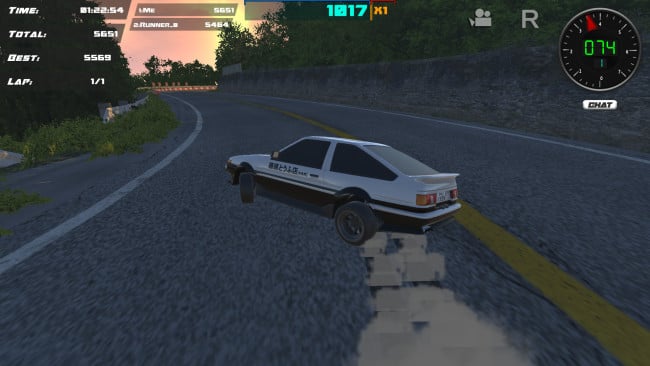
Tire smoke, sharp countersteering, and pounding eurobeat define the appeal of Drift86, a focused arcade racer built around keeping a slide alive for as long as possible. Rather than chasing realistic motorsport simulation, it turns drifting into a high-score challenge where every corner can extend a lucrative combo or bring it crashing down. The mood is bright, fast, and knowingly rooted in street-racing culture, with the legendary Toyota AE86-style machine naturally taking center stage. It is an immediately readable driving game, but clean runs demand timing, car control, and enough nerve to stay on the throttle when a safer driver would lift.
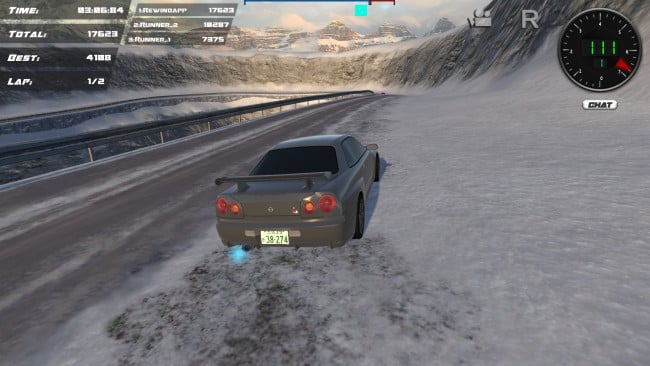
Each session revolves around selecting a car and map, then linking drifts to build records through corners without losing momentum. The handling prioritizes accessible arcade slides, so players can quickly start throwing cars sideways while still learning how steering input, acceleration, and course layout affect a long combo. More than a dozen vehicles and over seven maps provide different surfaces, routes, and visual backdrops for refining runs. Solo play suits score chasers looking to master every turn, while multiplayer races let friends compete directly and use live chat to share the inevitable near-misses, bragging, and challenges. Xbox controller compatibility also makes it a natural fit for players who prefer analogue steering and triggers over a keyboard.
What separates Drift86 from more serious drifting games is its stripped-down commitment to the satisfying part: finding a rhythm, sliding through a sequence of bends, and watching a score climb alongside energetic music. The Eurobeat soundtrack gives its runs an old-school arcade pulse that recalls the pop-culture appeal of Initial D more than the technical tuning obsession of CarX Drift Racing Online. Its small selection of locations and cars means it is not a sprawling driving sandbox, but that focus makes it easy to pick up for short sessions. Drift86 fits newcomers who want uncomplicated sideways action, as well as experienced arcade racers who enjoy chasing cleaner, longer, higher-scoring lines.
Installation
- Click the green button below to be redirected to UploadHaven.
- Wait 15 seconds, then hit “Free Download.” (Free downloads may be slower — upgrade to UploadHaven Pro for faster speeds.)
- Once downloaded, right-click the .zip file and choose “Extract to Drift86.” (You’ll need 7-Zip for this.)
- Open the extracted folder and run the game as administrator.
- Enjoy! 🎮 If you see missing DLL errors, check the <strong>_Redist</strong> folder inside and install what’s needed.
System Requirements
- Requires a 64-bit processor and operating system
- OS: Windows 7/8/10 – 64bits
- Processor: 2 GHz Intel Pentium 4 or AMD Athlon or equivalent
- Memory: 2 GB RAM
- Graphics: Intel HD Graphique
- Storage: 2 GB available space
- Sound Card: All
Setup Guide & Troubleshooting
How do I fix missing DLL errors for Drift86 (v2023.01.26 & ALL DLC)?
After extracting Drift86 (v2023.01.26 & ALL DLC), navigate to the _Redist or _CommonRedist folder inside the game directory and install DirectX, Vcredist, and any other dependencies included.
What should I do if the downloaded file is corrupted?
The full archive is 2.06 GB — make sure your download completed fully before extracting. Use 7-Zip to extract the files. If you still see a "file corrupted" error, re-download and try again.
Why should I run the game as administrator?
Right-click the game executable and select "Run as Administrator" to avoid save file issues and permission errors. This is especially important on the first launch.
How do I update my GPU drivers for this game?
Drift86 (v2023.01.26 & ALL DLC) requires a Intel HD Graphique or equivalent. Update your NVIDIA or AMD drivers to the latest version for the best performance.
The game won't launch — what should I try?
Try running in compatibility mode, install the latest DirectX runtime, or install the All-in-One VC Redist Package.
My antivirus is blocking the game — is it safe?
Antivirus false positives are common with pre-installed games. Temporarily pause your antivirus during extraction to prevent it from quarantining game files. You can re-enable it after the extraction completes.