
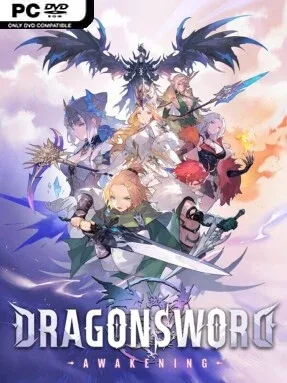
Game Overview
A sunlit fantasy continent becomes the stage for an anime-styled action RPG about a young traveler pulled into a mercenary crew and a crisis far larger than himself. Lute’s road to the human kingdom of Orbis changes after meeting the hardened fighter Johnny and the elf Castella, placing him on the trail of an ancient blade and a returning dragon. The mood balances colorful, welcoming towns and rolling fields with a growing sense of danger beneath the surface. DragonSword: Awakening frames its main adventure around legacy, companionship, and the question of whether an inexperienced hero can live up to an old legend.
Combat centers on building a party from 19 playable Heroes and rapidly swapping between them during fights. Each character brings distinct attacks, afflictions, and Signal Skills, allowing players to extend chains by exploiting enemy conditions and timing their switches well. Outside battle, Orbis invites free-roaming exploration across grasslands, waterways, underground rooms, and concealed dungeon spaces, with treasure hunting and local errands adding texture to the journey. Gathering ingredients for cooking, talking to residents, solving regional problems, and collecting Familiars give the world a more relaxed RPG routine between major confrontations.
Its biggest strength is the attempt to marry flashy tag-team action with a warmer, community-focused adventure structure. Unreal Engine 5 presentation supports a bright, richly colored world rather than the grim realism common to many modern fantasy RPGs, while the cast includes unusual personalities such as an elf obsessed with ruins and a mysterious traveler tied to other dimensions. The hero-switching system should especially appeal to players who enjoy the active party management of Genshin Impact or character-action RPGs, but want a more dedicated story campaign and traditional fantasy setting. Newcomers can enjoy the approachable exploration and colorful tone, while action veterans have reason to experiment with ailment setups, party combinations, and long combo routes.
Installation
- Click the green button below to be redirected to UploadHaven.
- Wait 15 seconds, then hit “Free Download.” (Free downloads may be slower — upgrade to UploadHaven Pro for faster speeds.)
- Once downloaded, right-click the .zip file and choose “Extract to DragonSword : Awakening.” (You’ll need 7-Zip for this.)
- Open the extracted folder and run the game as administrator.
- Enjoy! 🎮 If you see missing DLL errors, check the <strong>_Redist</strong> folder inside and install what’s needed.
System Requirements
- Requires a 64-bit processor and operating system
- OS: Windows 10
- Processor: Intel i5-9400F
- Memory: 8 GB RAM
- Graphics: NVIDIA Geforce GTX1660
- DirectX: Version 12
- Storage: 25 GB available space
- Additional Notes: ※ IMPORTANT: An SSD is strictly required for an optimal gameplay experience. Installing the game on an HDD may result in extended loading times, texture pop-in, framerate drops, or unexpected crashes.
Setup Guide & Troubleshooting
How do I fix missing DLL errors for DragonSword:Awakening (v1.0.9 & ALL DLC)?
After extracting DragonSword:Awakening (v1.0.9 & ALL DLC), navigate to the _Redist or _CommonRedist folder inside the game directory and install DirectX, Vcredist, and any other dependencies included.
What should I do if the downloaded file is corrupted?
The full archive is 16.87 GB — make sure your download completed fully before extracting. Use 7-Zip to extract the files. If you still see a "file corrupted" error, re-download and try again.
Why should I run the game as administrator?
Right-click the game executable and select "Run as Administrator" to avoid save file issues and permission errors. This is especially important on the first launch.
How do I update my GPU drivers for this game?
DragonSword:Awakening (v1.0.9 & ALL DLC) requires a NVIDIA Geforce GTX1660 or equivalent. Update your NVIDIA or AMD drivers to the latest version for the best performance.
The game won't launch — what should I try?
This game requires Version 12. Try running in compatibility mode, install the latest DirectX runtime, or install the All-in-One VC Redist Package.
My antivirus is blocking the game — is it safe?
Antivirus false positives are common with pre-installed games. Temporarily pause your antivirus during extraction to prevent it from quarantining game files. You can re-enable it after the extraction completes.