

Game Overview
A cramped apartment, a blank page, and a shrinking bank balance form the starting point for a surprisingly methodical author-career simulator. Drafting Tales turns the dream of becoming a celebrated novelist into a cycle of planning projects, managing inspiration, and making hard financial decisions while working toward bigger homes and greater recognition. Its tone is gentle rather than dramatic, but the pressure of rent, deadlines, and uncertain publication opportunities gives every manuscript a practical stakes. Success means more than finishing a book: it means building a reputation strong enough to retire wealthy, famous, and comfortably removed from the writing desk.
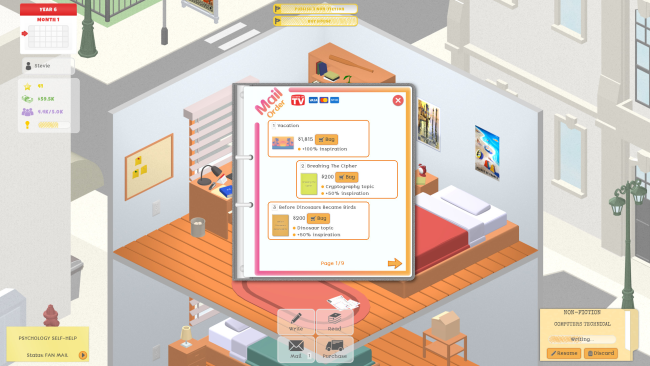
Players choose whether to create articles, short fiction, nonfiction, or full novels, then pair genres with subjects and distribute limited effort across the parts of each work. Finding combinations that readers appreciate is a process of experimentation, with peer feedback helping reveal which creative choices produce stronger results. Inspiration acts as the central resource, so efficient writers must decide when to push through another project, when to seek improvements, and how to cover expenses between payments. Completed work can go to agents and publishers, appear on a personal website, or be released independently with customized presentation, leading to reviews, sales, fans, and potential awards.
What makes Drafting Tales appealing is its focus on the unglamorous craft and business side of authorship rather than treating writing as a simple button press. New genres, themes, project formats, and purchasable perks steadily broaden the available strategies, while upgrades turn early poverty into visible lifestyle progression. It carries some of the accessible, number-driven satisfaction of Game Dev Tycoon, but replaces technology trends with literary experimentation and publishing decisions. Writers at heart and fans of relaxed management games should find plenty to enjoy, especially if they like optimizing a career without needing fast reflexes or complex simulation systems.
Installation
- Click the green button below to be redirected to UploadHaven.
- Wait 15 seconds, then hit “Free Download.” (Free downloads may be slower — upgrade to UploadHaven Pro for faster speeds.)
- Once downloaded, right-click the .zip file and choose “Extract to Drafting Tales.” (You’ll need 7-Zip for this.)
- Open the extracted folder and run the game as administrator.
- Enjoy! 🎮 If you see missing DLL errors, check the <strong>_Redist</strong> folder inside and install what’s needed.
System Requirements
- Requires a 64-bit processor and operating system
- OS: Windows 10
- Processor: Intel Celeron N3060
- Memory: 2 GB RAM
- Graphics: Intel HD Graphics
- Storage: 300 MB available space
Setup Guide & Troubleshooting
How do I fix missing DLL errors for Drafting Tales (v1.0)?
After extracting Drafting Tales (v1.0), navigate to the _Redist or _CommonRedist folder inside the game directory and install DirectX, Vcredist, and any other dependencies included.
What should I do if the downloaded file is corrupted?
The full archive is 165.26 MB — make sure your download completed fully before extracting. Use 7-Zip to extract the files. If you still see a "file corrupted" error, re-download and try again.
Why should I run the game as administrator?
Right-click the game executable and select "Run as Administrator" to avoid save file issues and permission errors. This is especially important on the first launch.
How do I update my GPU drivers for this game?
Drafting Tales (v1.0) requires a Intel HD Graphics or equivalent. Update your NVIDIA or AMD drivers to the latest version for the best performance.
The game won't launch — what should I try?
Try running in compatibility mode, install the latest DirectX runtime, or install the All-in-One VC Redist Package.
My antivirus is blocking the game — is it safe?
Antivirus false positives are common with pre-installed games. Temporarily pause your antivirus during extraction to prevent it from quarantining game files. You can re-enable it after the extraction completes.