

Game Overview
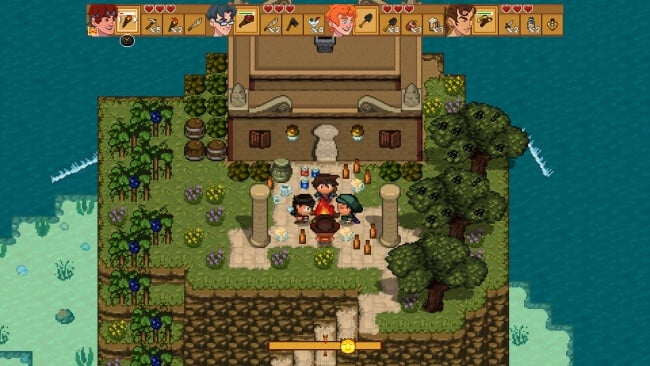
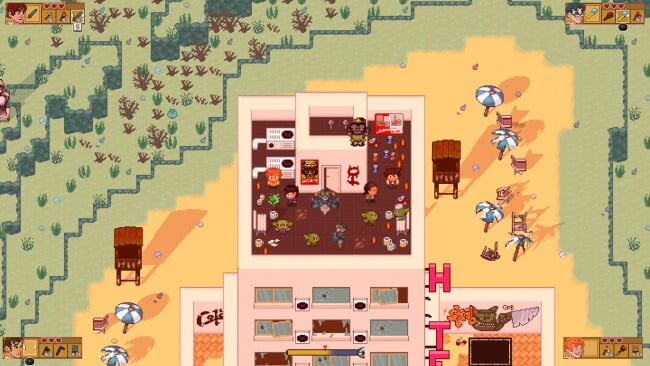
Four perpetually unlucky friends wash ashore on an alien world with no clothes, no memories, and an alarming number of monsters between them and a way home. Doom & Destiny Worlds turns that ridiculous setup into a sprawling, joke-heavy turn-based RPG where fantasy clichés collide with survival crafting and sandbox freedom. Its tone is proudly silly, full of genre references, bizarre enemies, and dialogue that treats an existential mystery with the same concern as finding dinner. Beneath the comedy sits a surprisingly broad adventure across handcrafted regions, strange dungeons, and dangerous biomes.
Combat follows classic party-based JRPG rules, with four heroes choosing attacks, skills, items, and tactical options against groups of enemies. Exploration feeds a constant gather-craft-build loop: chop trees, mine resources, farm materials, cook useful supplies, create equipment, and construct bases that support longer expeditions. The world does not simply funnel players through a linear quest path, so preparation matters when venturing into tougher zones or hunting for ingredients and secrets. Local co-op for up to four players lets a group share the same adventure, making resource runs, battles, and base construction far more chaotic and social.
What separates it from a typical retro RPG is the willingness to blend Dragon Quest-style battles with the compulsive collection and building of games such as Terraria or Minecraft. Pixel-art environments are colorful and readable, while the enemy roster leans hard into absurdity, from costume-obsessed goblins to creatures designed around deliberately juvenile jokes. Progress comes from both character development and the practical satisfaction of turning raw wilderness into a stocked, functional home base. Doom & Destiny Worlds suits players who enjoy old-school RPG systems but want more freedom than a traditional campaign offers, especially if they appreciate irreverent humor and have friends nearby for couch co-op.
Installation
- Click the green button below to be redirected to UploadHaven.
- Wait 15 seconds, then hit “Free Download.” (Free downloads may be slower — upgrade to UploadHaven Pro for faster speeds.)
- Once downloaded, right-click the .zip file and choose “Extract to Doom & Destiny Worlds.” (You’ll need 7-Zip for this.)
- Open the extracted folder and run the game as administrator.
- Enjoy! 🎮 If you see missing DLL errors, check the <strong>_Redist</strong> folder inside and install what’s needed.
System Requirements
- OS: Windows 10
- Processor: Intel i3
- Memory: 4096 MB RAM
- Graphics: Dedicated graphic with at least 512 MB Ram
- Storage: 1000 MB available space
Setup Guide & Troubleshooting
How do I fix missing DLL errors for Doom & Destiny Worlds (v0.183.10029)?
After extracting Doom & Destiny Worlds (v0.183.10029), navigate to the _Redist or _CommonRedist folder inside the game directory and install DirectX, Vcredist, and any other dependencies included.
What should I do if the downloaded file is corrupted?
The full archive is 626.96 MB — make sure your download completed fully before extracting. Use 7-Zip to extract the files. If you still see a "file corrupted" error, re-download and try again.
Why should I run the game as administrator?
Right-click the game executable and select "Run as Administrator" to avoid save file issues and permission errors. This is especially important on the first launch.
How do I update my GPU drivers for this game?
Doom & Destiny Worlds (v0.183.10029) requires a Dedicated graphic with at least 512 MB Ram or equivalent. Update your NVIDIA or AMD drivers to the latest version for the best performance.
The game won't launch — what should I try?
Try running in compatibility mode, install the latest DirectX runtime, or install the All-in-One VC Redist Package.
My antivirus is blocking the game — is it safe?
Antivirus false positives are common with pre-installed games. Temporarily pause your antivirus during extraction to prevent it from quarantining game files. You can re-enable it after the extraction completes.