

Game Overview
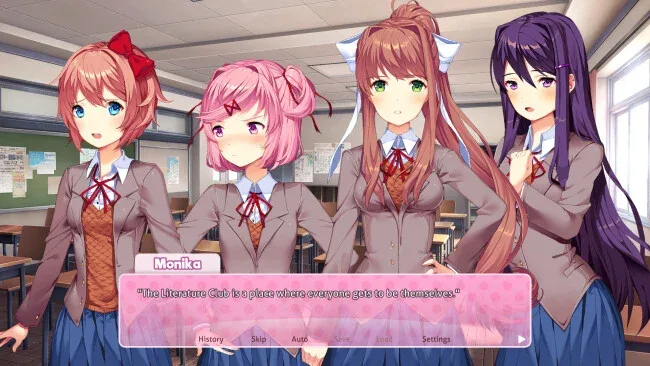
A cheerful after-school literature club hides one of the sharpest psychological horror experiences in modern visual novels. Doki Doki Literature Club Plus! begins as a deliberately familiar dating sim: a reluctant student joins four girls to share poems, talk about books, and pursue a possible romance. Its bright anime presentation, sugary music, and awkward school comedy create a convincing sense of comfort before the story starts bending the rules of its own genre. The tone shifts from playful and sentimental to deeply unsettling, using discomfort and surprise rather than conventional combat or chase sequences.
Most of your time goes into reading dialogue, choosing responses, and composing poems through a simple word-selection minigame. Each word appeals more strongly to a particular club member, influencing scenes and routes while encouraging repeated playthroughs to uncover different outcomes. Choices matter, although the game’s larger horror premise eventually challenges the usual promise that dating sims offer total control over a perfect ending. Plus! frames the original story inside a faux desktop interface, where players unlock files, artwork, music, and additional material as they investigate the surrounding mystery. There is no multiplayer component, and its relatively short main story works best when played without guides, spoilers, or prior knowledge of its twists.
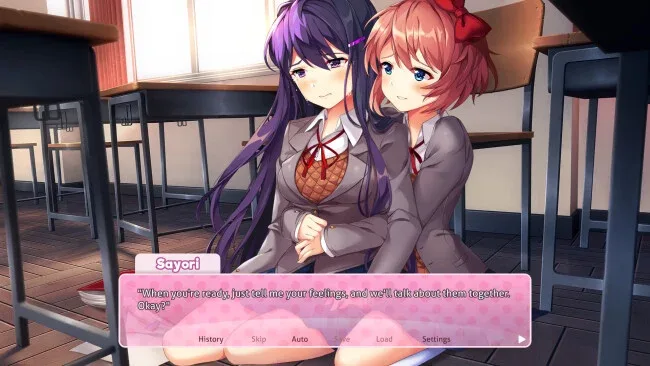
What separates it from countless anime romance games is its willingness to weaponize familiar visual-novel conventions, including menus, save habits, character routes, and the player’s expectations. The Plus edition adds six Side Stories that spend more time on the club’s friendships and personal struggles, presenting warmer character material alongside a substantial gallery, concept art, wallpapers, and an expanded soundtrack. Full HD art makes the visual presentation cleaner, though the original’s intentionally simple style remains part of its charm. Fans of Meta-horror games such as Undertale or Inscryption, and visual-novel players looking for a memorable genre subversion, should find plenty to discuss here; newcomers can enjoy it too, provided they are comfortable with disturbing themes involving mental health, self-harm, and emotional manipulation.
Screenshots
Installation
- Click the green button below to be redirected to UploadHaven.
- Wait 15 seconds, then hit “Free Download.” (Free downloads may be slower — upgrade to UploadHaven Pro for faster speeds.)
- Once downloaded, right-click the .zip file and choose “Extract to Doki Doki Literature Club Plus!.” (You’ll need 7-Zip for this.)
- Open the extracted folder and run the game as administrator.
- Enjoy! 🎮 If you see missing DLL errors, check the <strong>_Redist</strong> folder inside and install what’s needed.
System Requirements
- Requires a 64-bit processor and operating system
- OS *: Windows 7 or higher
- Processor: 1.8 GHz Dual-Core CPU
- Memory: 4 GB RAM
- Graphics: Integrated Graphics
- Storage: 3 GB available space
Setup Guide & Troubleshooting
How do I fix missing DLL errors for Doki Doki Literature Club Plus!?
After extracting Doki Doki Literature Club Plus!, navigate to the _Redist or _CommonRedist folder inside the game directory and install DirectX, Vcredist, and any other dependencies included.
What should I do if the downloaded file is corrupted?
The full archive is 2.79 GB — make sure your download completed fully before extracting. Use 7-Zip to extract the files. If you still see a "file corrupted" error, re-download and try again.
Why should I run the game as administrator?
Right-click the game executable and select "Run as Administrator" to avoid save file issues and permission errors. This is especially important on the first launch.
How do I update my GPU drivers for this game?
Doki Doki Literature Club Plus! requires a Integrated Graphics or equivalent. Update your NVIDIA or AMD drivers to the latest version for the best performance.
The game won't launch — what should I try?
Try running in compatibility mode, install the latest DirectX runtime, or install the All-in-One VC Redist Package.
My antivirus is blocking the game — is it safe?
Antivirus false positives are common with pre-installed games. Temporarily pause your antivirus during extraction to prevent it from quarantining game files. You can re-enable it after the extraction completes.