
Game Overview
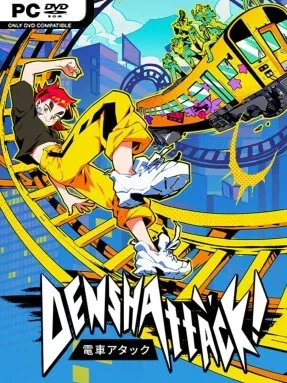
A gravity-defying train becomes the unlikeliest weapon in a rebellious ride across a corporate-controlled future Japan. Denshattack! mixes arcade racing, skateboarding-style trick scoring, and action-adventure momentum as a rookie rail rider joins a misfit resistance against the Miraidō corporation. The mood is loud, colorful, and deliberately ridiculous, trading grounded simulation for flying locomotives, outrageous stunts, and anime-flavored boss encounters. Its journey stretches from domed megacities to open countryside, volcanic territory, snowfields, and oceans, giving the rail network a globe-trotting sense of scale within Japan.
Players pilot and customize a train that can leave conventional tracks behind, using ollies, flips, grinds, and carefully timed landings to maintain speed and build scores. Each run revolves around reading the terrain, chaining tricks into combos, and handling a vehicle that behaves more like a skateboard than a traditional locomotive. Progression takes the protagonist from inexperienced newcomer toward elite Denshattacker, with rival trains, gangs, rebels, and increasingly formidable opponents shaping the route forward. Boss fights interrupt the racing flow with absurd set pieces, including mechanized magical girls, mobile fortresses, giant worms, and an entire force of hostile riders.
What makes Denshattack! notable is its commitment to a strange but coherent central idea: extreme-sports rail travel in a neon corporate dystopia. Rather than simply using trains as vehicles, it turns them into customizable stunt machines and makes Japan’s famous rail culture part of the fantasy. The changing regions should keep the challenge from feeling like a single-city score attack, while high-score chasing gives skilled players a reason to revisit routes and tighten their lines. Fans of Jet Set Radio’s rebellious style, Tony Hawk’s combo-driven rhythm, and fast arcade racers should find plenty to like, especially if they value imagination over realism.
Installation
- Click the green button below to be redirected to UploadHaven.
- Wait 15 seconds, then hit “Free Download.” (Free downloads may be slower — upgrade to UploadHaven Pro for faster speeds.)
- Once downloaded, right-click the .zip file and choose “Extract to Denshattack!.” (You’ll need 7-Zip for this.)
- Open the extracted folder and run the game as administrator.
- Enjoy! 🎮 If you see missing DLL errors, check the <strong>_Redist</strong> folder inside and install what’s needed.
System Requirements
- Requires a 64-bit processor and operating system
- OS: Windows 10
- Processor: Intel Core i5-6600K (4 * 3500) or AMD Ryzen 3 2200G (4 * 3500)
- Memory: 12 GB RAM
- Graphics: NVIDIA GeForce GTX 1050 Ti (4096 MB) or AMD Radeon RX 570 (4096 MB)
- DirectX: Version 12
- Storage: 8 GB available space
Setup Guide & Troubleshooting
How do I fix missing DLL errors for Denshattack!?
After extracting Denshattack!, navigate to the _Redist or _CommonRedist folder inside the game directory and install DirectX, Vcredist, and any other dependencies included.
What should I do if the downloaded file is corrupted?
The full archive is 7.56 GB — make sure your download completed fully before extracting. Use 7-Zip to extract the files. If you still see a "file corrupted" error, re-download and try again.
Why should I run the game as administrator?
Right-click the game executable and select "Run as Administrator" to avoid save file issues and permission errors. This is especially important on the first launch.
How do I update my GPU drivers for this game?
Denshattack! requires a NVIDIA GeForce GTX 1050 Ti (4096 MB) or AMD Radeon RX 570 (4096 MB) or equivalent. Update your NVIDIA or AMD drivers to the latest version for the best performance.
The game won't launch — what should I try?
This game requires Version 12. Try running in compatibility mode, install the latest DirectX runtime, or install the All-in-One VC Redist Package.
My antivirus is blocking the game — is it safe?
Antivirus false positives are common with pre-installed games. Temporarily pause your antivirus during extraction to prevent it from quarantining game files. You can re-enable it after the extraction completes.