
Game Overview
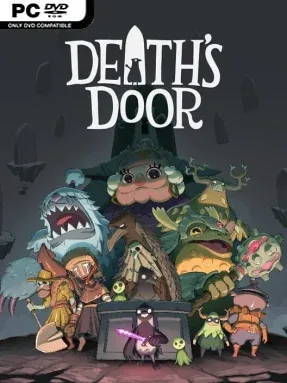
A tiny crow carrying an oversized sword turns a bureaucratic afterlife into one of the sharpest action adventures in years. Death’s Door follows a soul-reaper whose routine assignment goes wrong when a collected soul is stolen, sending him beyond the company’s mysterious doors into a land where death has stopped doing its job. The result is a melancholy but playful isometric quest, full of crumbling estates, overgrown ruins, eccentric spirits, and powerful rulers who have outlived any natural end. Its humor is dry, its sadness lands surprisingly hard, and its compact world rewards attention without drowning players in busywork.
Combat centers on deliberate sword strikes, dodge rolls, arrows, and magic abilities, with enemies and bosses demanding patience rather than button-mashing. Every swing has commitment, so learning attack patterns, creating openings, and spending magic at the right moment matters, especially against the game’s memorable large-scale encounters. Souls earned from fallen foes function as currency for permanent upgrades to strength, agility, health, and magic, while new tools steadily open routes, shortcuts, secrets, and puzzle solutions throughout earlier areas. Exploration also involves finding hidden shrines, planting seeds to restore health pots, solving environmental challenges, and piecing together where each strange resident fits into the larger mystery.
What separates Death’s Door from many Zelda-inspired indies is its unusually confident atmosphere: the clean, angular art style makes every shadowy garden and abandoned hall feel distinct, while the score shifts smoothly between lonely, ominous, and warmly whimsical. The world is tightly interconnected and respects the player’s curiosity, with optional collectibles, post-game challenges, and secret paths providing a worthwhile reason to revisit completed regions. Difficulty is demanding but fair, closer to a gentler Soulslike than a punishing endurance test, and death rarely wastes much time. Fans of Tunic, classic top-down Zelda, Hyper Light Drifter, or precise boss-focused action games should feel at home, while newcomers get an accessible, polished entry point into the genre.
Installation
- Click the green button below to be redirected to UploadHaven.
- Wait 15 seconds, then hit “Free Download.” (Free downloads may be slower — upgrade to UploadHaven Pro for faster speeds.)
- Once downloaded, right-click the .zip file and choose “Extract to Death's Door.” (You’ll need 7-Zip for this.)
- Open the extracted folder and run the game as administrator.
- Enjoy! 🎮 If you see missing DLL errors, check the <strong>_Redist</strong> folder inside and install what’s needed.
System Requirements
- OS: Windows 10 x64
- Processor: Intel Core i5-8250U (4 * 1800) or equivalent; AMD Phenom II X4 965 (4 * 3400) or equivalent
- Memory: 8 GB RAM
- Graphics: GeForce MX 150 ( 2048 MB); Radeon R7 260X (2048 MB)
- Storage: 5 GB available space
Setup Guide & Troubleshooting
How do I fix missing DLL errors for Death’s Door (v1.1.5.1)?
After extracting Death’s Door (v1.1.5.1), navigate to the _Redist or _CommonRedist folder inside the game directory and install DirectX, Vcredist, and any other dependencies included.
What should I do if the downloaded file is corrupted?
The full archive is 1.88 GB — make sure your download completed fully before extracting. Use 7-Zip to extract the files. If you still see a "file corrupted" error, re-download and try again.
Why should I run the game as administrator?
Right-click the game executable and select "Run as Administrator" to avoid save file issues and permission errors. This is especially important on the first launch.
How do I update my GPU drivers for this game?
Death’s Door (v1.1.5.1) requires a GeForce MX 150(2048 MB); Radeon R7 260X (2048 MB) or equivalent. Update your NVIDIA or AMD drivers to the latest version for the best performance.
The game won't launch — what should I try?
Try running in compatibility mode, install the latest DirectX runtime, or install the All-in-One VC Redist Package.
My antivirus is blocking the game — is it safe?
Antivirus false positives are common with pre-installed games. Temporarily pause your antivirus during extraction to prevent it from quarantining game files. You can re-enable it after the extraction completes.