

Game Overview
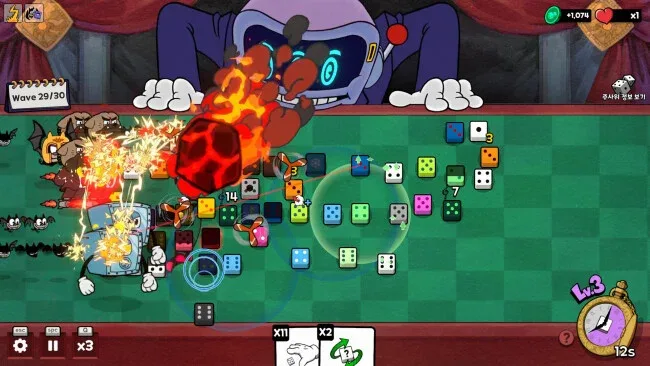
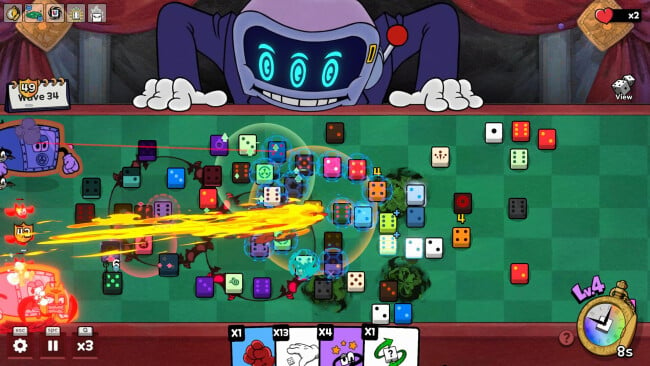
A hostile tabletop becomes the entire battlefield in Dealer’s Dice, a compact roguelite defense game built around luck, greed, and carefully managed risk. Trapped in the game room of an unknown dealer, you must stop waves of invading entities before they travel the length of the table. Your arsenal is not guns or soldiers, but a growing collection of dice whose faces, rarity, placement, and interactions determine whether a run survives. The mood is tense and slightly sinister, turning every harmless-looking roll into a high-stakes decision.
Runs revolve around placing dice on the board, letting their values and effects damage or disrupt enemies, then deciding whether the result in front of you is good enough. Rerolls offer the chance to improve a weak setup or chase a more valuable die, but they can just as easily ruin a reliable defense when a wave is closing in. Between battles, you draft modifier cards that alter dice behavior, strengthen particular values, create chain reactions, or otherwise push a build toward absurd levels of damage. Progress carries beyond a single attempt through chips and tokens, which unlock additional dice options, a larger table, and upgrades that widen the range of strategies available in later runs.
What makes Dealer’s Dice appealing is the freedom to turn randomness into a system you can manipulate rather than merely endure. Board positioning matters alongside luck, while card-and-dice combinations invite the same satisfying build crafting found in roguelites such as Balatro and Slay the Spire, filtered through a lane-defense format. Its short-run structure and escalating stakes make it easy to replay, especially for players who enjoy experimenting until an unlikely synergy suddenly wipes out an entire board. Anyone who wants a conventional tower defense game may find its reliance on rerolls unforgiving, but risk-loving strategy fans will appreciate how often a bad hand can become a winning one.
Screenshots
Installation
- Click the green button below to be redirected to UploadHaven.
- Wait 15 seconds, then hit “Free Download.” (Free downloads may be slower — upgrade to UploadHaven Pro for faster speeds.)
- Once downloaded, right-click the .zip file and choose “Extract to Dealer's Dice.” (You’ll need 7-Zip for this.)
- Open the extracted folder and run the game as administrator.
- Enjoy! 🎮 If you see missing DLL errors, check the <strong>_Redist</strong> folder inside and install what’s needed.
System Requirements
- Requires a 64-bit processor and operating system
- OS: Windows 10 (64-bit)
- Processor: Core i3 Dual/Quad
- Memory: 4 GB RAM
- Graphics: GTX 750 Ti
- DirectX: Version 11
- Storage: 2 GB available space
Setup Guide & Troubleshooting
How do I fix missing DLL errors for Dealer’s Dice (v1.0.3)?
After extracting Dealer’s Dice (v1.0.3), navigate to the _Redist or _CommonRedist folder inside the game directory and install DirectX, Vcredist, and any other dependencies included.
What should I do if the downloaded file is corrupted?
The full archive is 208.55 MB — make sure your download completed fully before extracting. Use 7-Zip to extract the files. If you still see a "file corrupted" error, re-download and try again.
Why should I run the game as administrator?
Right-click the game executable and select "Run as Administrator" to avoid save file issues and permission errors. This is especially important on the first launch.
How do I update my GPU drivers for this game?
Dealer’s Dice (v1.0.3) requires a GTX 750 Ti or equivalent. Update your NVIDIA or AMD drivers to the latest version for the best performance.
The game won't launch — what should I try?
This game requires Version 11. Try running in compatibility mode, install the latest DirectX runtime, or install the All-in-One VC Redist Package.
My antivirus is blocking the game — is it safe?
Antivirus false positives are common with pre-installed games. Temporarily pause your antivirus during extraction to prevent it from quarantining game files. You can re-enable it after the extraction completes.