
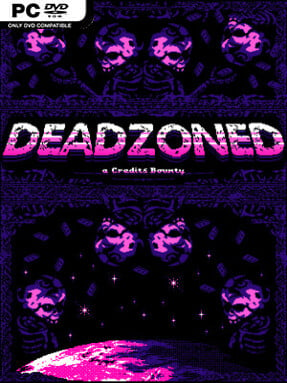
Game Overview
Celestious is a ruined colony where every descent underground feels like a calculated act of desperation. Deadzoned is a fast, turn-based sci-fi roguelike built around scavenging hostile sectors after nanites and interplanetary war reduce civilization to starving survivors, raiders, and things far worse in the dark. Its retro-styled presentation and grimly silly enemy design give the apocalypse character without making it relentlessly oppressive. Runs are tense but brisk, balancing tactical positioning and resource management with the immediate satisfaction of blasting mutants, cultists, beasts, and blackout horrors.
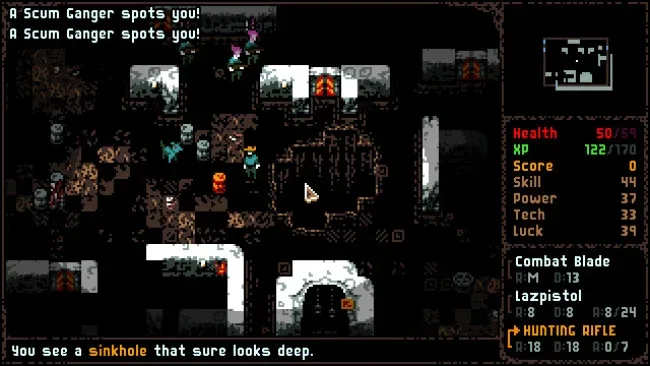
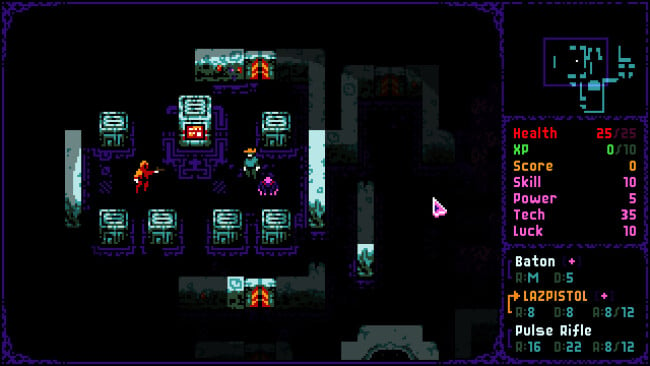
Each expedition sends a chosen class through randomly assembled zones filled with enemies, loot, machines, and optional encounters. Combat unfolds on a grid in turns, but the pace favors decisive movement and aggressive weapon use rather than slow, overly cautious dungeon crawling; ammunition, not inventory capacity, is the pressure point. Weapons and strange equipment accumulate quickly, while experience unlocks stat improvements and class-specific Talents that shape a run into a gun-heavy scavenger, psychic specialist, or technology-focused survivor. Riskier branches, including corrupted or forbidden areas, offer better rewards and scores, yet they can just as easily end a promising build against a boss or an unexpected swarm.
Procedural layouts, randomized events, and several run lengths make Deadzoned easy to revisit whether there are twenty minutes available or an evening to burn. The class roster is a major strength: Bounty Hunters, Psychics, Technomaniacs, and the deliberately disadvantaged Wretch approach leveling and equipment priorities differently, encouraging experimentation rather than one solved strategy. Leaderboards add an arcade-style reason to chase cleaner clears, while the Clashful Cards side activity provides a lower-stakes collectible card diversion against AI or a local opponent. Fans of traditional roguelikes who want less inventory micromanagement and more immediate, score-driven shooting should find plenty to like, especially if they enjoy the scrappy build variety of games such as DoomRL or Jupiter Hell.
Screenshots
Installation
- Click the green button below to be redirected to UploadHaven.
- Wait 15 seconds, then hit “Free Download.” (Free downloads may be slower — upgrade to UploadHaven Pro for faster speeds.)
- Once downloaded, right-click the .zip file and choose “Extract to Deadzoned.” (You’ll need 7-Zip for this.)
- Open the extracted folder and run the game as administrator.
- Enjoy! 🎮 If you see missing DLL errors, check the <strong>_Redist</strong> folder inside and install what’s needed.
System Requirements
- OS: Microsoft Windows 10
- Processor: 2 GHz
- Memory: 1 GB RAM
- Graphics: 1 GB VRAM
- DirectX: Version 11
- Storage: 200 MB available space
Setup Guide & Troubleshooting
How do I fix missing DLL errors for Deadzoned (v1.1)?
After extracting Deadzoned (v1.1), navigate to the _Redist or _CommonRedist folder inside the game directory and install DirectX, Vcredist, and any other dependencies included.
What should I do if the downloaded file is corrupted?
The full archive is 199.27 MB — make sure your download completed fully before extracting. Use 7-Zip to extract the files. If you still see a "file corrupted" error, re-download and try again.
Why should I run the game as administrator?
Right-click the game executable and select "Run as Administrator" to avoid save file issues and permission errors. This is especially important on the first launch.
How do I update my GPU drivers for this game?
Deadzoned (v1.1) requires a 1 GB VRAM or equivalent. Update your NVIDIA or AMD drivers to the latest version for the best performance.
The game won't launch — what should I try?
This game requires Version 11. Try running in compatibility mode, install the latest DirectX runtime, or install the All-in-One VC Redist Package.
My antivirus is blocking the game — is it safe?
Antivirus false positives are common with pre-installed games. Temporarily pause your antivirus during extraction to prevent it from quarantining game files. You can re-enable it after the extraction completes.