
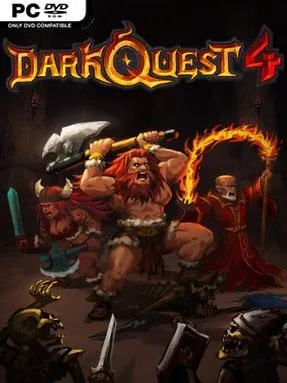
Game Overview
A candlelit dungeon crawl built around careful turns and creeping tension, Dark Quest 4 channels the feel of a classic tabletop fantasy campaign without demanding a physical board or a game master. Gulak, servant of the Dark Sorcerer, sends monstrous forces into the night while villagers disappear from their homes, leaving a small band of adventurers to uncover what is happening. The mood is deliberately old-school: tiled chambers, hidden dangers, treasure hunts, and sudden fights where a single bad decision can punish an overconfident party. Rather than chasing spectacle, it focuses on the satisfying rhythm of opening doors, weighing risks, and surviving one more room.
Each of the 30 handcrafted quests sends heroes through multi-level dungeons filled with more than 40 enemy types, traps, magic, and tactical encounters. Players command a roster of up to 10 distinct heroes, assembling a team around different statistics and special powers, then improving them at the Hero Camp through training, cards, and new abilities. Positioning, turn order, and party composition matter as much as raw strength, especially when monsters block narrow corridors or a trap turns a safe-looking route into a disaster. Local and online co-op for up to three players lets friends split control of the party, making victories feel collaborative and failures considerably funnier.
Its strongest feature is the combination of a curated campaign and a creator mode that encourages players to build their own dungeon layouts and quests. Community-made adventures give the game a longer tail than a straightforward 30-mission strategy campaign, while the accessible board-game presentation keeps its systems readable. Dark Quest 4 suits players who enjoy the deliberate, dice-and-dungeon spirit of HeroQuest, as well as fans of tactical RPGs who prefer compact missions over enormous open worlds. Veterans can experiment with team builds and player-made challenges, while newcomers get a clear, approachable introduction to turn-based dungeon tactics.
Installation
- Click the green button below to be redirected to UploadHaven.
- Wait 15 seconds, then hit “Free Download.” (Free downloads may be slower — upgrade to UploadHaven Pro for faster speeds.)
- Once downloaded, right-click the .zip file and choose “Extract to Dark Quest 4.” (You’ll need 7-Zip for this.)
- Open the extracted folder and run the game as administrator.
- Enjoy! 🎮 If you see missing DLL errors, check the <strong>_Redist</strong> folder inside and install what’s needed.
System Requirements
- Requires a 64-bit processor and operating system
- OS: Windows 10 64-bit
- Processor: Intel Core2 Duo E8400 or AMD Phenom II x2 550
- Memory: 8 GB RAM
- Graphics: DX 11 Compatible GPU
- DirectX: Version 11
- Storage: 2 GB available space
Setup Guide & Troubleshooting
How do I fix missing DLL errors for Dark Quest 4 (v2025.11.06)?
After extracting Dark Quest 4 (v2025.11.06), navigate to the _Redist or _CommonRedist folder inside the game directory and install DirectX, Vcredist, and any other dependencies included.
What should I do if the downloaded file is corrupted?
The full archive is 655.22 MB — make sure your download completed fully before extracting. Use 7-Zip to extract the files. If you still see a "file corrupted" error, re-download and try again.
Why should I run the game as administrator?
Right-click the game executable and select "Run as Administrator" to avoid save file issues and permission errors. This is especially important on the first launch.
How do I update my GPU drivers for this game?
Dark Quest 4 (v2025.11.06) requires a DX 11 Compatible GPU or equivalent. Update your NVIDIA or AMD drivers to the latest version for the best performance.
The game won't launch — what should I try?
This game requires Version 11. Try running in compatibility mode, install the latest DirectX runtime, or install the All-in-One VC Redist Package.
My antivirus is blocking the game — is it safe?
Antivirus false positives are common with pre-installed games. Temporarily pause your antivirus during extraction to prevent it from quarantining game files. You can re-enable it after the extraction completes.