
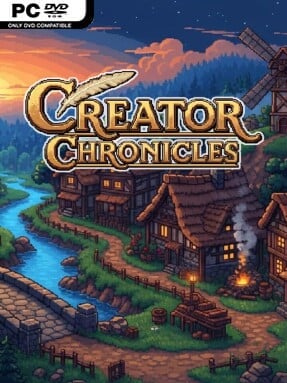
Game Overview
A stranded developer becomes the unlikely center of a fantasy management RPG where every guild decision shapes the path home. Creator Chronicles mixes village rebuilding, crafting, trading, and dungeon raiding into a cheerful but lightly stressful simulation of running an online-game guild. Its colorful world is full of chatty recruits, busy workshops, burned-out structures, and dangerous monster-filled instances waiting beyond the village gates. The tone stays playful and community-focused, yet failure carries real weight when a defeated member’s fragile morale can cause them to leave for good.
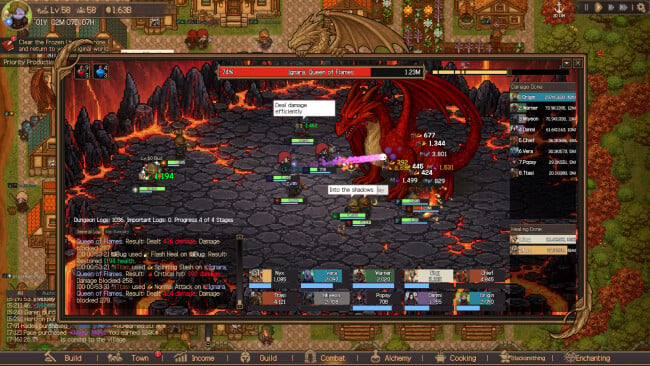
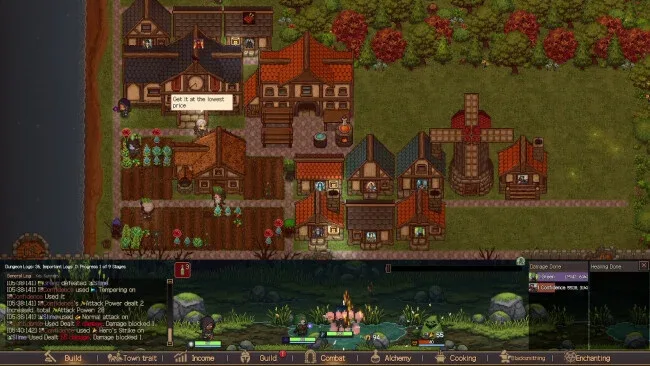
As guild master, you recruit characters with different personalities and professions, then put them to work mining, farming, fishing, brewing, cooking, forging, and enchanting. Resources feed into a steady growth loop: clear ruined buildings, construct useful facilities, produce goods, improve equipment, and sell surplus stock through an auction house whose shifting prices reward patience and market awareness. Dungeon battles revolve around assembling parties and letting simultaneous encounters play out, with levels, loot, and gold earned as members survive tougher challenges. Losing is not merely a temporary setback; battle logs encourage players to study weak points, improve gear or party composition, and protect recruits before attempting raids again.
The standout idea is its blend of cozy village life and the social volatility of multiplayer guild culture, translated into a single-player management framework. Members feel less like anonymous workers because their abilities, conversations, and willingness to remain in the guild influence long-term plans, while the Codex gives dedicated crafters and collectors clear goals across several professions. Players can chase efficient auction profits and optimized raid teams, or slow down to decorate, watch workers socialize, and build a self-sustaining settlement. Anyone who enjoys the production chains of shop-management games alongside the party preparation of idle RPGs should find plenty to do, while genre veterans will appreciate the extra pressure created by morale, losses, and careful resource planning.
Screenshots
Installation
- Click the green button below to be redirected to UploadHaven.
- Wait 15 seconds, then hit “Free Download.” (Free downloads may be slower — upgrade to UploadHaven Pro for faster speeds.)
- Once downloaded, right-click the .zip file and choose “Extract to Creator Chronicles.” (You’ll need 7-Zip for this.)
- Open the extracted folder and run the game as administrator.
- Enjoy! 🎮 If you see missing DLL errors, check the <strong>_Redist</strong> folder inside and install what’s needed.
System Requirements
- OS: Window 10
- Processor: Intel i5 6th generation or higher, AMD Ryzen 5 4th generation or higher
- Memory: 8 GB RAM
- Graphics: GeForce GTX 1050 or higher, Radeon RX 5500 or higher
- Storage: 16 GB available space
- Sound Card: Onboard audio
Setup Guide & Troubleshooting
How do I fix missing DLL errors for Creator Chronicles (v1.01)?
After extracting Creator Chronicles (v1.01), navigate to the _Redist or _CommonRedist folder inside the game directory and install DirectX, Vcredist, and any other dependencies included.
What should I do if the downloaded file is corrupted?
The full archive is 1.38 GB — make sure your download completed fully before extracting. Use 7-Zip to extract the files. If you still see a "file corrupted" error, re-download and try again.
Why should I run the game as administrator?
Right-click the game executable and select "Run as Administrator" to avoid save file issues and permission errors. This is especially important on the first launch.
How do I update my GPU drivers for this game?
Creator Chronicles (v1.01) requires a GeForce GTX 1050 or higher, Radeon RX 5500 or higher or equivalent. Update your NVIDIA or AMD drivers to the latest version for the best performance.
The game won't launch — what should I try?
Try running in compatibility mode, install the latest DirectX runtime, or install the All-in-One VC Redist Package.
My antivirus is blocking the game — is it safe?
Antivirus false positives are common with pre-installed games. Temporarily pause your antivirus during extraction to prevent it from quarantining game files. You can re-enable it after the extraction completes.