
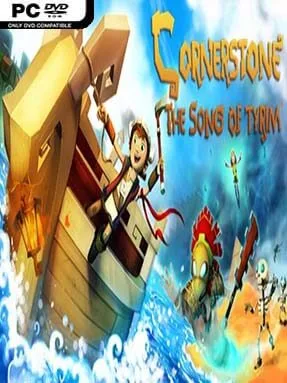
Game Overview
A bright, physics-driven fantasy adventure sends a young Viking named Tyrim across a chain of strange islands after his fellow villagers vanish without warning. Cornerstone: The Song of Tyrim mixes the free-roaming curiosity of classic Zelda games with a playful, slightly clumsy sense of experimentation, where a useful invention can be just as dangerous to its creator as to an enemy. Its colorful low-poly landscapes hide ruins, caves, hostile creatures, absurd characters, and enough environmental hazards to keep every shoreline feeling unpredictable. Beneath the cheerful presentation sits a substantial quest to uncover what happened to Tyrim’s people and confront the force behind their disappearance.
Progress comes from scavenging materials, finding blueprints, completing quests, and turning collected items into weapons, tools, armor, and improvised transport. Combat is action-oriented and deliberately physical: Tyrim swings melee weapons, blocks attacks, uses ranged options, and often benefits from exploiting terrain or sending objects flying. Puzzles regularly ask players to manipulate weight, momentum, switches, explosives, water, and movable objects rather than simply hunt for a key. Boats, gliders, carts, and other crafted contraptions expand exploration, while new gear opens routes through previously inaccessible areas.
Its best idea is the willingness to let players solve problems messily. A carefully constructed vehicle can carry Tyrim across water or over a ravine, but a poorly balanced design can also tip over, break apart, or launch him into trouble, giving the adventure a charming sandbox quality. The world rewards poking into odd corners, and its humor helps offset occasional rough edges in combat and movement. Players who enjoy Banjo-Kazooie-style collecting, Zelda-like dungeon puzzles, and the DIY experimentation of games such as Scrap Mechanic find plenty to like here; newcomers should be ready for some trial and error, while veteran explorers get the most from testing every strange tool they uncover.
Installation
- Click the green button below to be redirected to UploadHaven.
- Wait 15 seconds, then hit “Free Download.” (Free downloads may be slower — upgrade to UploadHaven Pro for faster speeds.)
- Once downloaded, right-click the .zip file and choose “Extract to Cornerstone: The Song of Tyrim.” (You’ll need 7-Zip for this.)
- Open the extracted folder and run the game as administrator.
- Enjoy! 🎮 If you see missing DLL errors, check the <strong>_Redist</strong> folder inside and install what’s needed.
System Requirements
- OS: Windows XP SP2
- Processor: Dual Core 2.0GHz or equivalent processor
- Memory: 4 GB RAM
- Graphics: 512 MB
- DirectX: Version 9.0
- Storage: 3 GB available space
Setup Guide & Troubleshooting
How do I fix missing DLL errors for Cornerstone: The Song of Tyrim (v3.1.7)?
After extracting Cornerstone: The Song of Tyrim (v3.1.7), navigate to the _Redist or _CommonRedist folder inside the game directory and install DirectX, Vcredist, and any other dependencies included.
What should I do if the downloaded file is corrupted?
The full archive is 1.40 GB — make sure your download completed fully before extracting. Use 7-Zip to extract the files. If you still see a "file corrupted" error, re-download and try again.
Why should I run the game as administrator?
Right-click the game executable and select "Run as Administrator" to avoid save file issues and permission errors. This is especially important on the first launch.
How do I update my GPU drivers for this game?
Cornerstone: The Song of Tyrim (v3.1.7) requires a 512 MB or equivalent. Update your NVIDIA or AMD drivers to the latest version for the best performance.
The game won't launch — what should I try?
This game requires Version 9.0. Try running in compatibility mode, install the latest DirectX runtime, or install the All-in-One VC Redist Package.
My antivirus is blocking the game — is it safe?
Antivirus false positives are common with pre-installed games. Temporarily pause your antivirus during extraction to prevent it from quarantining game files. You can re-enable it after the extraction completes.