
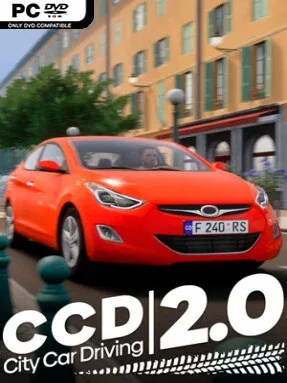
Game Overview
A dense urban road network turns ordinary driving into a tense, detail-focused simulation where awareness matters more than raw speed. City Car Driving 2.0 places you behind the wheel in a believable region governed by traffic lights, lane markings, road signs, speed limits, and the everyday etiquette expected on public streets. Its mood is closer to a driving lesson under pressure than an arcade racer, especially when fog reduces visibility, rain changes conditions, or nighttime traffic hides hazards until the last moment.
Most sessions revolve around navigating city streets correctly while responding to changing situations: merging into traffic, observing right-of-way rules, braking for pedestrians, and recovering from sudden mistakes without causing a collision. AI-controlled drivers follow the rules often enough to create convincing traffic flow, but their differing personalities mean some hesitate, some push ahead, and others make poor decisions that force you to react. Routes can progress from controlled urban maneuvers to more demanding road and off-road challenges, giving newer drivers room to learn the basics before tackling unpredictable scenarios. Success comes from patience, mirror checks, speed control, and reading the road ahead rather than simply reaching a finish line first.
The strongest feature is its emphasis on the messy, unscripted nature of real traffic. Dynamic weather, pedestrians, and vehicles that can misjudge a situation make familiar routes feel less repetitive than a standard driving test simulator. Rather than offering the spectacular crashes or high-speed rivalry of Forza Horizon or Need for Speed, it rewards careful driving in the vein of Euro Truck Simulator’s more grounded road moments. It suits players who want to practice traffic awareness, enjoy realistic vehicle handling, or prefer a calm but demanding simulation where one careless turn can change the entire drive.
Installation
- Click the green button below to be redirected to UploadHaven.
- Wait 15 seconds, then hit “Free Download.” (Free downloads may be slower — upgrade to UploadHaven Pro for faster speeds.)
- Once downloaded, right-click the .zip file and choose “Extract to City Car Driving 2.0.” (You’ll need 7-Zip for this.)
- Open the extracted folder and run the game as administrator.
- Enjoy! 🎮 If you see missing DLL errors, check the <strong>_Redist</strong> folder inside and install what’s needed.
System Requirements
- Requires a 64-bit processor and operating system
- OS: Windows 10 / 11 (64 bit)
- Processor: Intel Core i5 – 8400 2,8 GHz / AMD Ryzen 5 2600 3,4 GHz
- Memory: 8 GB RAM
- Graphics: nVidia GeForce GTX1660 6 GB VRAM / AMD RX 5700 8 GB VRAM
- DirectX: Version 12
- Storage: 15 GB available space
- Sound Card: Any sound card compatible with DirectX
Setup Guide & Troubleshooting
How do I fix missing DLL errors for City Car Driving 2.0 (v2.0.3)?
After extracting City Car Driving 2.0 (v2.0.3), navigate to the _Redist or _CommonRedist folder inside the game directory and install DirectX, Vcredist, and any other dependencies included.
What should I do if the downloaded file is corrupted?
The full archive is 11.40 GB — make sure your download completed fully before extracting. Use 7-Zip to extract the files. If you still see a "file corrupted" error, re-download and try again.
Why should I run the game as administrator?
Right-click the game executable and select "Run as Administrator" to avoid save file issues and permission errors. This is especially important on the first launch.
How do I update my GPU drivers for this game?
City Car Driving 2.0 (v2.0.3) requires a nVidia GeForce GTX1660 6 GB VRAM / AMD RX 5700 8 GB VRAM or equivalent. Update your NVIDIA or AMD drivers to the latest version for the best performance.
The game won't launch — what should I try?
This game requires Version 12. Try running in compatibility mode, install the latest DirectX runtime, or install the All-in-One VC Redist Package.
My antivirus is blocking the game — is it safe?
Antivirus false positives are common with pre-installed games. Temporarily pause your antivirus during extraction to prevent it from quarantining game files. You can re-enable it after the extraction completes.