
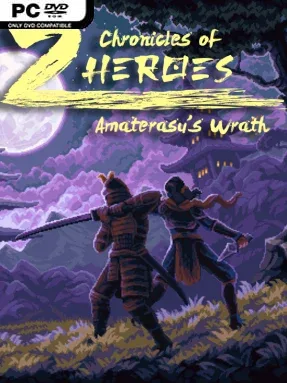
Game Overview
Feudal Japan becomes a hostile labyrinth of cursed shrines, imperial strongholds, and monster-filled routes as a wrathful sun goddess tightens her control over the land. Chronicles of 2 Heroes: Amaterasu’s Wrath frames its story around two trained siblings, samurai Kensei and kunoichi Ayame, who set out to take the sacred relics sustaining Empress Himiko’s regime. The result is a brisk, demanding 16-bit action platformer with a serious mythological backdrop, chunky pixel-art detail, and the kind of precise movement that rewards patience over reckless rushing.
Combat and traversal revolve around swapping heroes instantly, often in the middle of a dangerous sequence. Kensei brings a katana, durability, and brutal close-range attacks, but his inability to jump turns ledges and vertical hazards into problems only Ayame can solve; she trades his direct strength for acrobatics and ranged offense. Levels ask players to read enemy patterns, avoid spikes and pits, find alternate paths, and combine both characters’ specialties to clear obstacle courses. New techniques gradually expand the toolkit, including mobility upgrades, hard-hitting ground attacks, and crowd-control options, so previously unreachable areas become viable destinations as the campaign progresses.
Its central character-switching idea gives the familiar retro-platformer format a useful strategic twist rather than simply offering two cosmetic heroes. Ayame and Kensei feel deliberately asymmetrical, making every encounter a question of which limitation is safer to manage, especially when yokai, ronin, and environmental threats crowd the screen. Japanese folklore supplies the enemy roster and atmosphere, while the visual presentation recalls the colorful, disciplined look of classic 16-bit console adventures without abandoning modern responsiveness. Players who enjoy the demanding platforming of Mega Man, the route-finding of lighter Metroidvania games, or character-based action challenges will find plenty to like, though newcomers should expect a learning curve built around careful timing and repeated attempts.
Installation
- Click the green button below to be redirected to UploadHaven.
- Wait 15 seconds, then hit “Free Download.” (Free downloads may be slower — upgrade to UploadHaven Pro for faster speeds.)
- Once downloaded, right-click the .zip file and choose “Extract to Chronicles of 2 Heroes: Amaterasu's Wrath.” (You’ll need 7-Zip for this.)
- Open the extracted folder and run the game as administrator.
- Enjoy! 🎮 If you see missing DLL errors, check the <strong>_Redist</strong> folder inside and install what’s needed.
System Requirements
- OS: Windows
- Storage: 761.32 MB available space
- License: Free
Setup Guide & Troubleshooting
How do I fix missing DLL errors for Chronicles of 2 Heroes: Amaterasu’s Wrath (v2024.06.12)?
After extracting Chronicles of 2 Heroes: Amaterasu’s Wrath (v2024.06.12), navigate to the _Redist or _CommonRedist folder inside the game directory and install DirectX, Vcredist, and any other dependencies included.
What should I do if the downloaded file is corrupted?
The full archive is 761.32 MB — make sure your download completed fully before extracting. Use 7-Zip to extract the files. If you still see a "file corrupted" error, re-download and try again.
Why should I run the game as administrator?
Right-click the game executable and select "Run as Administrator" to avoid save file issues and permission errors. This is especially important on the first launch.
How do I update my GPU drivers for this game?
Update your NVIDIA or AMD drivers to the latest version for the best performance and compatibility.
The game won't launch — what should I try?
Try running in compatibility mode, install the latest DirectX runtime, or install the All-in-One VC Redist Package.
My antivirus is blocking the game — is it safe?
Antivirus false positives are common with pre-installed games. Temporarily pause your antivirus during extraction to prevent it from quarantining game files. You can re-enable it after the extraction completes.