
Game Overview
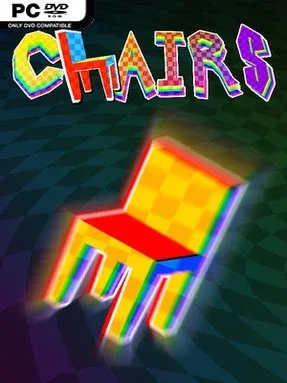
A sentient piece of furniture becomes the unlikely star of a brisk, surreal platforming sprint where absurd comedy gradually gives way to something much stranger. CHAIRS casts you as an initiate of the Fixture Friends, a suspiciously cheerful organization that assigns you the task of collecting mysterious Prisms for an impending ritual known as the Great Feeding. The tone lands somewhere between a cartoon fever dream and a deadpan cult satire, with wooden characters, bizarre imagery, and an intentionally unsettling sense that the friendly voices around you may not be telling the whole story. It is short, loud, and proudly weird rather than a sprawling narrative adventure.
Movement drives nearly every moment. You guide your chair through seven compact stages built around rapid jumps, momentum, hazards, and precision platforming, pushing to reach the finish as quickly as possible. Levels favor immediate retries and clean execution, so learning routes, shaving seconds from mistakes, and mastering each course’s strange obstacles become the central loop. A first run lasts roughly an hour, but time-attack scoring and online leaderboards give dedicated players a reason to return and chase sharper times. The design appears more interested in speed and rhythm than in long-term upgrades or open-ended exploration, making it an easy game to pick up for a focused session.
What separates CHAIRS from the crowded indie-platformer field is its commitment to the joke: it treats chair-related nonsense with complete sincerity while surrounding it with unnerving lore and hallucinatory presentation. Each stage has its own visual identity, and the original music reinforces the energetic, disorienting mood rather than fading into the background. Players who enjoy short experimental games, oddball humor, and score-chasing platformers will get the most from it, especially if titles like Super Meat Boy or the stranger corners of adult animation appeal to them. Newcomers can finish the main ride without a huge time investment, while genre veterans have enough room to test their reflexes and compete for faster runs.
Installation
- Click the green button below to be redirected to UploadHaven.
- Wait 15 seconds, then hit “Free Download.” (Free downloads may be slower — upgrade to UploadHaven Pro for faster speeds.)
- Once downloaded, right-click the .zip file and choose “Extract to CHAIRS.” (You’ll need 7-Zip for this.)
- Open the extracted folder and run the game as administrator.
- Enjoy! 🎮 If you see missing DLL errors, check the <strong>_Redist</strong> folder inside and install what’s needed.
System Requirements
- Requires a 64-bit processor and operating system
- OS: Windows 10/11
- Processor: Intel Core i7-4790
- Memory: 2 GB RAM
- Graphics: Nvidia GTX 960
- Storage: 755 MB available space
Setup Guide & Troubleshooting
How do I fix missing DLL errors for CHAIRS?
After extracting CHAIRS, navigate to the _Redist or _CommonRedist folder inside the game directory and install DirectX, Vcredist, and any other dependencies included.
What should I do if the downloaded file is corrupted?
The full archive is 459.22 MB — make sure your download completed fully before extracting. Use 7-Zip to extract the files. If you still see a "file corrupted" error, re-download and try again.
Why should I run the game as administrator?
Right-click the game executable and select "Run as Administrator" to avoid save file issues and permission errors. This is especially important on the first launch.
How do I update my GPU drivers for this game?
CHAIRS requires a Nvidia GTX 960 or equivalent. Update your NVIDIA or AMD drivers to the latest version for the best performance.
The game won't launch — what should I try?
Try running in compatibility mode, install the latest DirectX runtime, or install the All-in-One VC Redist Package.
My antivirus is blocking the game — is it safe?
Antivirus false positives are common with pre-installed games. Temporarily pause your antivirus during extraction to prevent it from quarantining game files. You can re-enable it after the extraction completes.