
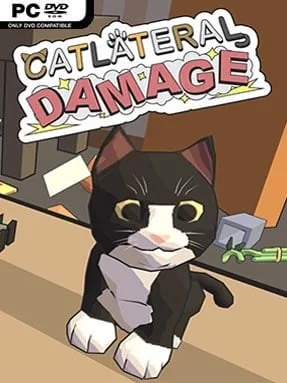
Game Overview
A quiet suburban home becomes a personal playground for a small, furry agent of chaos. Catlateral Damage is a lighthearted first-person destruction simulator that turns everyday rooms into obstacle courses packed with fragile clutter, prized possessions, and temptingly unstable shelves. Seen at floor level through a cat’s eyes, kitchens, bedrooms, and living rooms feel surprisingly large as you race to turn them upside down. The tone is silly rather than mean-spirited, built around the simple joy of making an enormous mess before time runs out.
Each session asks you to clear a room by batting enough objects from tables, counters, bookcases, and other elevated surfaces. Movement follows familiar first-person controls, including jumping and crouching, but your main tools are separate left and right paw swipes that let you slap items in different directions. Success unlocks more cats to play as, while pickups can provide temporary advantages and hidden cat photos give completionists another reason to scour every corner. Randomly assembled house layouts keep runs from becoming too predictable, although the basic goal remains satisfyingly direct: find valuables, knock them down, and move on before the clock expires.
Its strongest idea is how convincingly it sells a cat’s destructive curiosity without complicating the formula with unnecessary systems. Objects tumble, scatter, and sometimes stubbornly refuse to fall in ways that make improvised routes and frantic swiping part of the fun, while the deliberately chunky presentation keeps the focus on readable chaos. Catlateral Damage works best as a casual, humorous palate cleanser rather than a deep simulation, especially for players who enjoy the playful destruction of Goat Simulator but want a smaller, more focused challenge. Newcomers can grasp it immediately, and score chasers or cat lovers get the most value from its unlocks, collectibles, and repeatable layouts.
Installation
- Click the green button below to be redirected to UploadHaven.
- Wait 15 seconds, then hit “Free Download.” (Free downloads may be slower — upgrade to UploadHaven Pro for faster speeds.)
- Once downloaded, right-click the .zip file and choose “Extract to Catlateral Damage.” (You’ll need 7-Zip for this.)
- Open the extracted folder and run the game as administrator.
- Enjoy! 🎮 If you see missing DLL errors, check the <strong>_Redist</strong> folder inside and install what’s needed.
System Requirements
- OS: Windows XP
- Processor: 2.0 GHz
- Memory: 2 GB RAM
- Graphics: NVIDIA GeForce 8600 GT
- Storage: 1 GB available space
- Additional Notes: Epilepsy warning: Some in-game effects may be problematic for some players. These can be disabled under the “Audio/Visual” tab of the “Options” menu on the title screen.
Setup Guide & Troubleshooting
How do I fix missing DLL errors for Catlateral Damage?
After extracting Catlateral Damage, navigate to the _Redist or _CommonRedist folder inside the game directory and install DirectX, Vcredist, and any other dependencies included.
What should I do if the downloaded file is corrupted?
The full archive is 466.20 MB — make sure your download completed fully before extracting. Use 7-Zip to extract the files. If you still see a "file corrupted" error, re-download and try again.
Why should I run the game as administrator?
Right-click the game executable and select "Run as Administrator" to avoid save file issues and permission errors. This is especially important on the first launch.
How do I update my GPU drivers for this game?
Catlateral Damage requires a NVIDIA GeForce 8600 GT or equivalent. Update your NVIDIA or AMD drivers to the latest version for the best performance.
The game won't launch — what should I try?
Try running in compatibility mode, install the latest DirectX runtime, or install the All-in-One VC Redist Package.
My antivirus is blocking the game — is it safe?
Antivirus false positives are common with pre-installed games. Temporarily pause your antivirus during extraction to prevent it from quarantining game files. You can re-enable it after the extraction completes.