
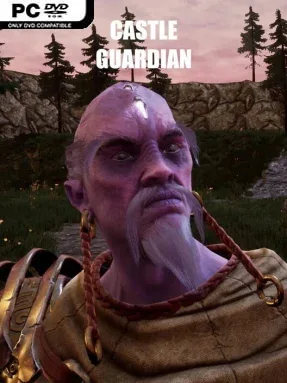
Game Overview
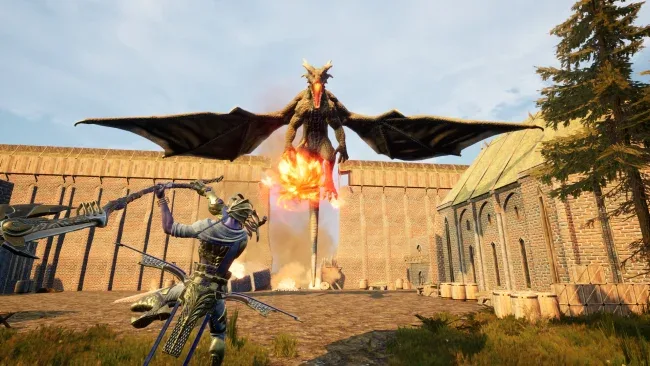
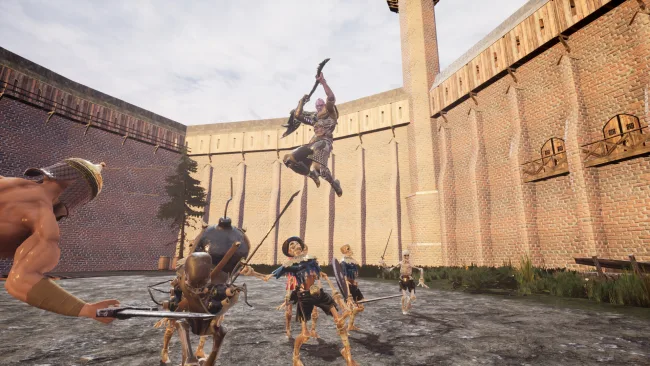
A besieged medieval stronghold becomes the center of a fast, hands-on defense battle in Castle Guardian. Rather than watching enemies march toward walls from a distance, you stand on the battlefield and help hold the line against skeleton troops, monsters, and increasingly dangerous assault waves. The tone is colorful fantasy rather than grim realism, but the pressure builds quickly as a damaged castle, limited funds, and swarming attackers demand constant attention. Your most important ally is a Centaur companion, turning each siege into a two-warrior stand against an invading army.
Combat mixes direct action with familiar tower-defense planning. You fight with weapons and dramatic powers that let you reposition instantly, strike from above, halt advancing foes, and unleash heavy spear-based attacks when a wave threatens to break through. Between attacks, earned currency goes toward repairing defenses, placing traps, improving your own effectiveness, and upgrading the Centaur so the pair can withstand tougher encounters. Each map includes a shop that makes spending choices meaningful, while stages can run through as many as ten escalating waves before forcing a decisive boss confrontation.
Castle Guardian stands out by giving tower defense a more active hero-focused structure: success depends on timing abilities and joining the fight, not simply arranging defenses and waiting. Different siege maps prevent the battles from feeling entirely static, and bosses add a useful change of pace from clearing standard enemy formations. Magical mushrooms provide another progression layer, as they can be found during play or exchanged for chest openings that award gold and cosmetic outfits. Players who enjoy the accessible action of Orcs Must Die! but want a simpler medieval fantasy setup with a companion character should find plenty to like, especially if they prefer short, repeatable defensive battles over sprawling strategy campaigns.
Screenshots
Installation
- Select the <strong>Download</strong> button at the top of this page to open UploadHaven.
- On UploadHaven, wait for any countdown, then select <strong>Free Download</strong>. Optional: UploadHaven Pro for faster downloads.
- When complete, extract the archive to a <strong>Castle Guardian</strong> folder using 7-Zip.
- Open the extracted folder and start the game normally.
- For errors, check <strong>Setup Guide & Troubleshooting</strong> below. Keep your security software enabled.
System Requirements
- Requires a 64-bit processor and operating system
- OS *: Windows 7
- Processor: Intel Core i5-6500
- Memory: 8 GB RAM
- Graphics: Nvidia GeForce GTX 960
- DirectX: Version 8.1
- Storage: 14 GB available space
Setup Guide & Troubleshooting
How do I fix missing DLL errors for Castle Guardian?
After extracting Castle Guardian, navigate to the _Redist or _CommonRedist folder inside the game directory and install DirectX, Vcredist, and any other dependencies included.
What should I do if the downloaded file is corrupted?
The full archive is 8.35 GB — make sure your download completed fully before extracting. Use 7-Zip to extract the files. If you still see a "file corrupted" error, re-download and try again.
Why should I run the game as administrator?
Right-click the game executable and select "Run as Administrator" to avoid save file issues and permission errors. This is especially important on the first launch.
How do I update my GPU drivers for this game?
Castle Guardian requires a Nvidia GeForce GTX 960 or equivalent. Update your NVIDIA or AMD drivers to the latest version for the best performance.
The game won't launch — what should I try?
This game requires Version 8.1. Try running in compatibility mode, install the latest DirectX runtime, or install the All-in-One VC Redist Package.
My antivirus is blocking the game — is it safe?
Antivirus false positives are common with pre-installed games. Temporarily pause your antivirus during extraction to prevent it from quarantining game files. You can re-enable it after the extraction completes.