
Cartridge Defense Cover Art

Cartridge Defense

INDIE 631.93 MB v1.0.1.1

Game Overview

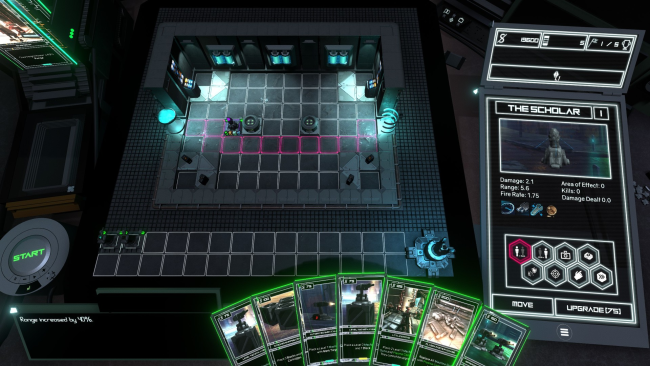
Neon-lit streets and machine-made threats give this indie tower defense game a sharp cyberpunk identity, but its real hook is the way every defensive tool comes from a customizable card deck. Robots march toward your objective in increasingly dangerous waves, while each cartridge you draw can become a tower, an upgrade, a tactical effect, or another piece of a carefully planned build. The mood sits between methodical puzzle-solving and the satisfying chaos of watching a well-built kill zone shred an entire convoy. Cartridge Defense rewards players who enjoy adjusting a strategy on the fly rather than relying on one fixed base layout.

Matches revolve around playing cartridges at the right moment, placing defenses to force enemies through longer routes, and tailoring tower priorities to handle the most urgent targets. Nine tower families offer distinct functions and each supports multiple upgrade levels, allowing a simple opening defense to grow into a specialized maze of damage, control, and support effects. Highly flexible targeting settings let players decide whether a tower focuses on the nearest robot, the toughest unit, priority threats, or other tactical conditions, adding more control than many traditional lane-defense games. Enemy drops feed the progression loop with new cards, card packs, items, resources, and targeting options that expand future decks.

More than 300 individual cards keep builds from becoming predictable, while the campaign’s 33 stages across five areas provide structured challenges with specific enemy rosters. Completed levels remain useful through Sponsored Mode, which introduces randomized spawns and extra rewards for players looking to farm cards or test experimental decks. Endless and roguelike-style modes further suit anyone who wants repeatable runs beyond the story, especially players who enjoy the deckbuilding decisions of Slay the Spire alongside the path manipulation of maze-focused tower defense games. Newcomers can start with straightforward tower placement, but veterans who love optimizing routes, aggro rules, and synergistic card pools find the deeper appeal here.

Installation

  1. Click the green button below to be redirected to UploadHaven.
  2. Wait 15 seconds, then hit “Free Download.” (Free downloads may be slower — upgrade to UploadHaven Pro for faster speeds.)
  3. Once downloaded, right-click the .zip file and choose “Extract to Cartridge Defense.” (You’ll need 7-Zip for this.)
  4. Open the extracted folder and run the game as administrator.
  5. Enjoy! 🎮 If you see missing DLL errors, check the <strong>_Redist</strong> folder inside and install what’s needed.

System Requirements

  • OS: Windows 7
  • Processor: Intel Core i3 6100 / AMD FX-4350
  • Memory: 4 GB RAM
  • Graphics: NVIDIA GeForce GTX 770 (2GB) / AMD Radeon R9 270X (2GB)
  • DirectX: Version 11
  • Network: Broadband Internet connection
  • Storage: 2 GB available space

Setup Guide & Troubleshooting

How do I fix missing DLL errors for Cartridge Defense (v1.0.1.1)?

After extracting Cartridge Defense (v1.0.1.1), navigate to the _Redist or _CommonRedist folder inside the game directory and install DirectX, Vcredist, and any other dependencies included.

What should I do if the downloaded file is corrupted?

The full archive is 631.93 MB — make sure your download completed fully before extracting. Use 7-Zip to extract the files. If you still see a "file corrupted" error, re-download and try again.

Why should I run the game as administrator?

Right-click the game executable and select "Run as Administrator" to avoid save file issues and permission errors. This is especially important on the first launch.

How do I update my GPU drivers for this game?

Cartridge Defense (v1.0.1.1) requires a NVIDIA GeForce GTX 770 (2GB) / AMD Radeon R9 270X (2GB) or equivalent. Update your NVIDIA or AMD drivers to the latest version for the best performance.

The game won't launch — what should I try?

This game requires Version 11. Try running in compatibility mode, install the latest DirectX runtime, or install the All-in-One VC Redist Package.

My antivirus is blocking the game — is it safe?

Antivirus false positives are common with pre-installed games. Temporarily pause your antivirus during extraction to prevent it from quarantining game files. You can re-enable it after the extraction completes.

Need more help? Browse our FAQ & Troubleshooting Guide for solutions to common issues.
Looking for something else? Explore all games on Steam Unlocked