
Game Overview
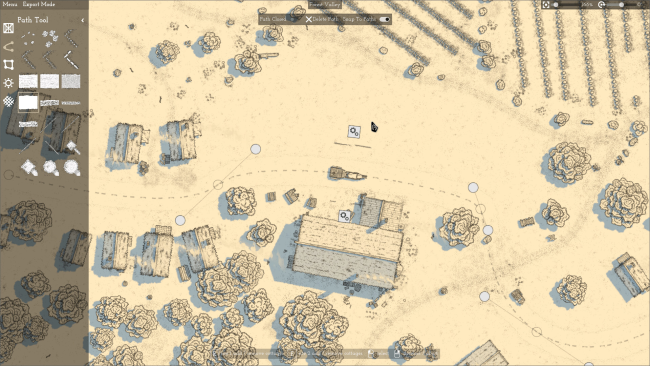
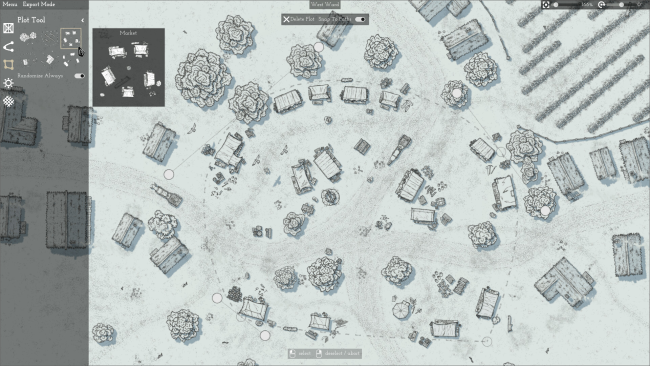
Fantasy cartography takes center stage in a focused creative tool built for rapidly shaping printable or digital maps. Rather than treating every tree, tower, road, and crate as a separate chore, Canvas of Kings turns broad ideas into editable paths and plots that populate themselves with varied scenery. The result feels closer to arranging a living tabletop battlefield or regional map than painstakingly drawing one object at a time. Its clean, minimal presentation keeps attention on composition, scale, and atmosphere instead of overwhelming users with a dense suite of illustration controls.
Most of the work revolves around laying down flexible routes and areas, then adjusting them whenever the design changes. A path can become a fortified wall lined with towers, while a plot can quickly grow into woodland or another decorated region through automatic placement rules. Randomized object properties and category-based selection prevent repeated assets from looking too uniform, and grouped props can be moved together for quick revisions—useful when rearranging defenses, settlements, or cluttered landmarks. Lighting and weather settings provide another practical layer, letting creators shift a map from bright and readable to misty, stormy, or ominous without rebuilding its layout.
Canvas of Kings stands out by prioritizing speed, variation, and revisable layouts over hand-crafted pixel-perfect detailing. Custom export regions and configurable grids make it particularly suitable for dungeon masters, miniature wargamers, board-game designers, and anyone who needs maps formatted for print or virtual tabletop use. Templates also make repeat projects far less repetitive, since preferred atmosphere, object behavior, and layout settings can carry forward into new work. Players looking for a conventional adventure will not find combat, quests, or a campaign here, but creators who enjoy the practical map-building side of games such as Dungeons & Dragons, Warhammer, or tactical RPGs get an approachable tool with enough automation to turn rough plans into convincing scenes quickly.
Installation
- Click the green button below to be redirected to UploadHaven.
- Wait 15 seconds, then hit “Free Download.” (Free downloads may be slower — upgrade to UploadHaven Pro for faster speeds.)
- Once downloaded, right-click the .zip file and choose “Extract to Canvas of Kings.” (You’ll need 7-Zip for this.)
- Open the extracted folder and run the game as administrator.
- Enjoy! 🎮 If you see missing DLL errors, check the <strong>_Redist</strong> folder inside and install what’s needed.
System Requirements
- Requires a 64-bit processor and operating system
- OS: Windows 7+
- Processor: 4 GHz CPU
- Memory: 8 GB RAM
- Graphics: Vulkan compatible graphics card
- Storage: 2 GB available space
- Additional Notes: Requirements may change; Requires a 64-bit processor and operating system
Setup Guide & Troubleshooting
How do I fix missing DLL errors for Canvas of Kings (v2026.08.03)?
After extracting Canvas of Kings (v2026.08.03), navigate to the _Redist or _CommonRedist folder inside the game directory and install DirectX, Vcredist, and any other dependencies included.
What should I do if the downloaded file is corrupted?
The full archive is 277.57 MB — make sure your download completed fully before extracting. Use 7-Zip to extract the files. If you still see a "file corrupted" error, re-download and try again.
Why should I run the game as administrator?
Right-click the game executable and select "Run as Administrator" to avoid save file issues and permission errors. This is especially important on the first launch.
How do I update my GPU drivers for this game?
Canvas of Kings (v2026.08.03) requires a Vulkan compatible graphics card or equivalent. Update your NVIDIA or AMD drivers to the latest version for the best performance.
The game won't launch — what should I try?
Try running in compatibility mode, install the latest DirectX runtime, or install the All-in-One VC Redist Package.
My antivirus is blocking the game — is it safe?
Antivirus false positives are common with pre-installed games. Temporarily pause your antivirus during extraction to prevent it from quarantining game files. You can re-enable it after the extraction completes.