
Game Overview
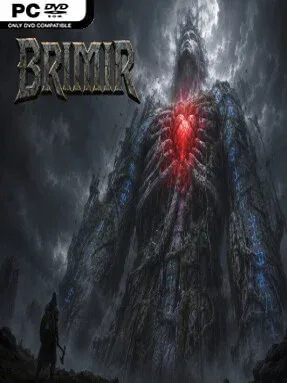
A dead colossus forms the entire landscape, turning flesh, ribs, and ancient wounds into a vertical fantasy world that feels equal parts mythic and hostile. Brimir: Pilgrimage to the Heart casts you as an axe-wielding pilgrim beginning at the giant’s feet and climbing toward the unreachable organ beating above the clouds. The mood is grim, lonely, and deliberately tense: every stretch of ground can become a grave, while the distant goal gives the journey a powerful sense of scale. Rather than treating death as a quick reset, it makes each ascent feel like a costly expedition.
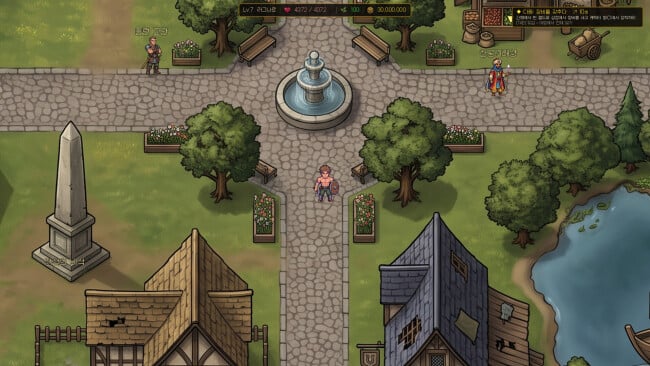
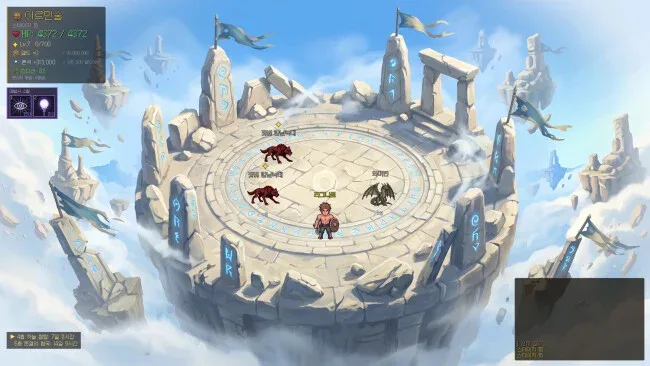
Combat plays out in side-view encounters built around attacking, guarding, movement, and a compact set of four active abilities. Defeated enemies yield runes, letting you steal their traits and gradually assemble a stronger build capable of overcoming the monsters that previously ended your run. Rune capacity grows with level, but limited slots force meaningful trade-offs between offense, defense, utility, and companion synergies. Procedurally arranged labyrinths, dangerous wardens, limited escape options, and a rising flood of the giant’s blood ensure that lingering rarely feels safe.
Permanent death wipes most of a pilgrim’s personal progress, including equipped equipment and many collected powers, but the legacy structure prevents the next life from feeling like an identical restart. Survivors inherit selected runes and relics, permanent trail upgrades, researched enemy information, faction standing, and the companions recruited during earlier attempts. Up to five companions can accompany the climb, and while you do not control them directly, their gear, runes, bonds, and awakenings make party construction a major strategic layer. Its demanding long-form progression and build experimentation should appeal to players who enjoy the pressure of roguelites mixed with the lasting character investment of an action RPG; newcomers need patience, while veterans of punishing systems will likely appreciate how thoroughly it makes every victory earned.
Screenshots
Installation
- Click the green button below to be redirected to UploadHaven.
- Wait 15 seconds, then hit “Free Download.” (Free downloads may be slower — upgrade to UploadHaven Pro for faster speeds.)
- Once downloaded, right-click the .zip file and choose “Extract to Brimir: Pilgrimage to the Heart.” (You’ll need 7-Zip for this.)
- Open the extracted folder and run the game as administrator.
- Enjoy! 🎮 If you see missing DLL errors, check the <strong>_Redist</strong> folder inside and install what’s needed.
System Requirements
- OS: Windows 10
- Processor: Dual-core 2.0 GHz+
- Memory: 4096 MB RAM
- Graphics: OpenGL 3.3 / Vulkan
- Storage: 500 MB available space
Setup Guide & Troubleshooting
How do I fix missing DLL errors for Brimir: Pilgrimage to the Heart?
After extracting Brimir: Pilgrimage to the Heart, navigate to the _Redist or _CommonRedist folder inside the game directory and install DirectX, Vcredist, and any other dependencies included.
What should I do if the downloaded file is corrupted?
The full archive is 1.06 GB — make sure your download completed fully before extracting. Use 7-Zip to extract the files. If you still see a "file corrupted" error, re-download and try again.
Why should I run the game as administrator?
Right-click the game executable and select "Run as Administrator" to avoid save file issues and permission errors. This is especially important on the first launch.
How do I update my GPU drivers for this game?
Brimir: Pilgrimage to the Heart requires a OpenGL 3.3 / Vulkan or equivalent. Update your NVIDIA or AMD drivers to the latest version for the best performance.
The game won't launch — what should I try?
Try running in compatibility mode, install the latest DirectX runtime, or install the All-in-One VC Redist Package.
My antivirus is blocking the game — is it safe?
Antivirus false positives are common with pre-installed games. Temporarily pause your antivirus during extraction to prevent it from quarantining game files. You can re-enable it after the extraction completes.