Game Overview
A ruined future becomes a vast engineering project in this single-player blend of factory automation, base building, and exploratory survival. As a Pioneer rebuilding civilization long after humanity’s collapse, you turn raw ore, crystals, and scavenged relics into the foundations of an industrial network. The mood balances lonely, atmospheric ruins with the deeply satisfying rhythm of watching a carefully planned settlement come alive. Hostile machines and remnants of the old world give the otherwise methodical construction loop some real stakes.
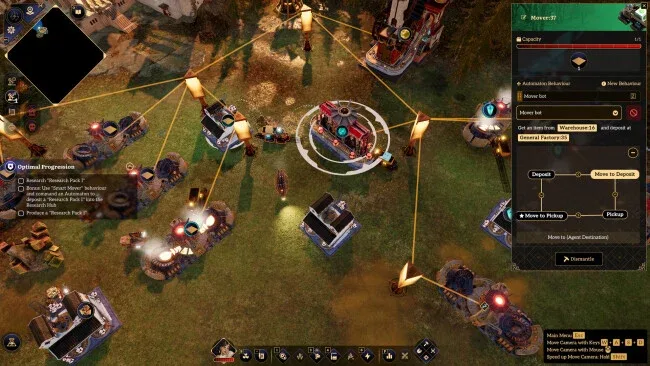
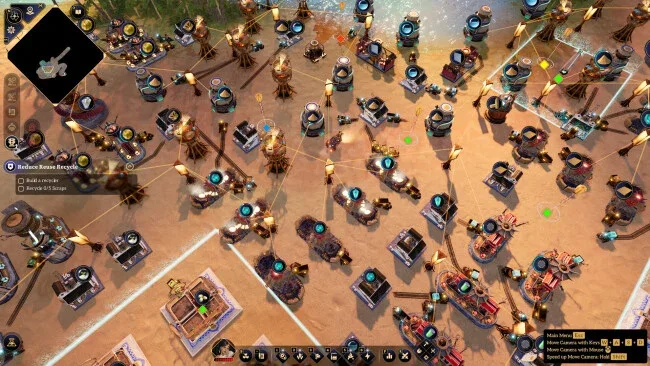
Production begins with mining and refining, then grows into increasingly elaborate chains for components, power, storage, and transport. Rather than laying conveyor belts or writing conventional code, you assign robotic workers through a readable behavior system: give them simple routines, define conditions, or assemble their logic manually as a visual graph. Factories communicate through colored signals, allowing warehouses, machines, and automatons to respond to changing supplies across a larger network. Blueprints speed up expansion by duplicating working designs, while cloned robots retain their assigned jobs, so scaling from one outpost to a continent-spanning operation feels practical rather than repetitive.
The standout idea is its natural-language automation: players can describe intended robot behavior in their own language, then refine the resulting instructions when a system needs more precision. Exploration also matters more than it does in many pure factory sims, with guarded ruins, dynamite barriers, turret defense, collectible relics, and a mystery surrounding humanity’s disappearance. Eventually, the Sky Pillar supports a gigantic mobile airship base that carries your industrial infrastructure between islands and biomes, making each new region part expedition and part logistics challenge. Anyone who enjoys the systemic problem-solving of Factorio or Satisfactory but wants a more adventure-driven, conveyor-free approach should find plenty to like, while newcomers benefit from the accessible robot-command tools.
Screenshots
Installation
- Select the <strong>Download</strong> button at the top of this page to open UploadHaven.
- On UploadHaven, wait for any countdown, then select <strong>Free Download</strong>. Optional: UploadHaven Pro for faster downloads.
- When complete, extract the archive to a <strong>Brave New Wonders</strong> folder using 7-Zip.
- Open the extracted folder and start the game normally.
- For errors, check <strong>Setup Guide & Troubleshooting</strong> below. Keep your security software enabled.
System Requirements
- OS: Windows 10 64-bit
- Processor: Intel(R) Core(TM) i5-6400
- Memory: 16 GB RAM
- Graphics: NVIDIA GeForce GTX 1650
- DirectX: Version 11
- Network: Broadband Internet connection
- Storage: 27 GB available space
- Sound Card: 100% DirectX 9.0c compatible sound card
- Additional Notes: SSD Hard Drive
Setup Guide & Troubleshooting
How do I fix missing DLL errors for Brave New Wonders?
After extracting Brave New Wonders, navigate to the _Redist or _CommonRedist folder inside the game directory and install DirectX, Vcredist, and any other dependencies included.
What should I do if the downloaded file is corrupted?
The full archive is 21.14 GB — make sure your download completed fully before extracting. Use 7-Zip to extract the files. If you still see a "file corrupted" error, re-download and try again.
Do I need to run the game as administrator?
Usually, no. Start the game normally from the extracted folder. If you see a permissions or save error, check that the folder is writable and follow the game's documented fix. Only grant administrator access when a trusted game's specific setup requires it.
How do I update my GPU drivers for this game?
Brave New Wonders requires a NVIDIA GeForce GTX 1650 or equivalent. Update your NVIDIA or AMD drivers to the latest version for the best performance.
The game won't launch — what should I try?
Check that extraction completed and your PC meets the system requirements, including Version 11. Note any error message before choosing a fix. If it identifies a missing runtime, install the required DirectX components or Microsoft Visual C++ Redistributable from Microsoft.
My antivirus is blocking the game — is it safe?
A warning needs to be investigated; the download source alone cannot confirm that a file is safe. Keep your security software enabled and review the detection details. Do not run or restore a flagged file unless you have verified that it is a false positive. If you are unsure, leave it quarantined.