

Game Overview
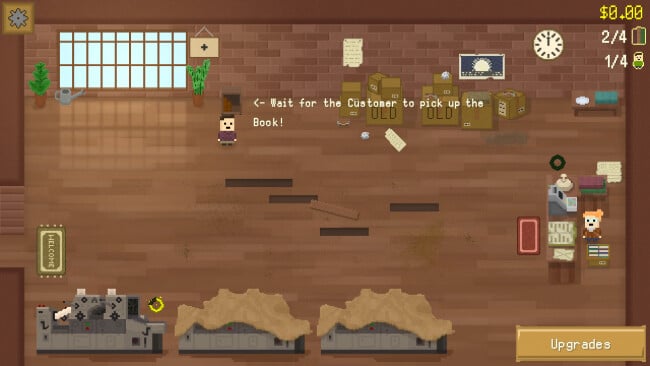
A cramped shop, one painfully slow printer, and a single shelf form the humble beginning of a surprisingly involved business-management idle game. Bookstore Incremental turns the quiet fantasy of running a bookshop into a brisk chase for profit, efficiency, and floor space, with constant little problems keeping the numbers from becoming completely hands-off. Its tone stays cozy and playful rather than stressful, but the growing crowd at the register, sticky-fingered thieves, and messy customers give the store a welcome sense of bustle. Over roughly five to six active hours, the goal shifts from selling a few modest volumes to operating a sprawling, highly optimized literary empire.
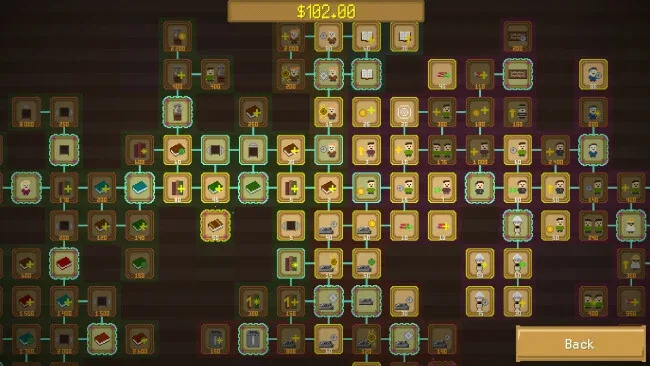
Money comes from printing books, stocking shelves, serving customers, and reinvesting every gain into better equipment and broader services. Players choose between a huge range of upgrades, improving book varieties, printers, shelving, staffing, customer flow, café options, transport links, and countless smaller efficiencies through an enormous skill tree. The key loop involves deciding which bottleneck deserves attention next: production may lag behind demand, the cashier line may become unmanageable, or a lack of shelf space may choke sales. Weather conditions alter store performance, while random disruptions and opportunities—such as reporters offering publicity for a fee—ask players to react rather than merely wait for totals to rise.
What separates it from more passive clickers is the density of its upgrade web: hundreds of nodes and thousands of individual improvements leave plenty of room to shape a preferred strategy. Upgrade choices do not follow a rigid route, so players can lean into faster printing, premium customers, store expansion, or quality-of-life automation according to the current run. New Game+ adds long-term replay value by granting a permanent income increase after completion, encouraging another attempt with a stronger foundation. Fans of compact management games and incremental titles such as AdVenture Capitalist or Cookie Clicker will appreciate its active pacing, while newcomers get a clear, approachable introduction to the genre’s satisfying optimization loop.
Screenshots
Installation
- Click the green button below to be redirected to UploadHaven.
- Wait 15 seconds, then hit “Free Download.” (Free downloads may be slower — upgrade to UploadHaven Pro for faster speeds.)
- Once downloaded, right-click the .zip file and choose “Extract to Bookstore Incremental.” (You’ll need 7-Zip for this.)
- Open the extracted folder and run the game as administrator.
- Enjoy! 🎮 If you see missing DLL errors, check the <strong>_Redist</strong> folder inside and install what’s needed.
System Requirements
- OS: Windows 10
- Processor: 2Ghz+
- Memory: 1024 MB RAM
- Graphics: Any
- Storage: 250 MB available space
Setup Guide & Troubleshooting
How do I fix missing DLL errors for Bookstore Incremental (v1.1.0)?
After extracting Bookstore Incremental (v1.1.0), navigate to the _Redist or _CommonRedist folder inside the game directory and install DirectX, Vcredist, and any other dependencies included.
What should I do if the downloaded file is corrupted?
The full archive is 107.80 MB — make sure your download completed fully before extracting. Use 7-Zip to extract the files. If you still see a "file corrupted" error, re-download and try again.
Why should I run the game as administrator?
Right-click the game executable and select "Run as Administrator" to avoid save file issues and permission errors. This is especially important on the first launch.
How do I update my GPU drivers for this game?
Bookstore Incremental (v1.1.0) requires a Any or equivalent. Update your NVIDIA or AMD drivers to the latest version for the best performance.
The game won't launch — what should I try?
Try running in compatibility mode, install the latest DirectX runtime, or install the All-in-One VC Redist Package.
My antivirus is blocking the game — is it safe?
Antivirus false positives are common with pre-installed games. Temporarily pause your antivirus during extraction to prevent it from quarantining game files. You can re-enable it after the extraction completes.