
Game Overview
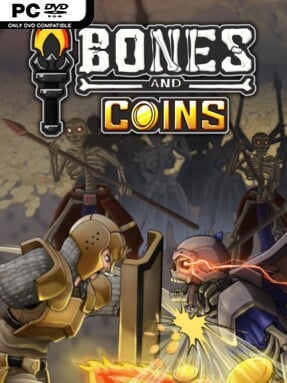
Coins spill from shattered skeletons as a growing band of adventurers pushes deeper into hostile catacombs. Bones and Coins is a compact dungeon-crawling progression game built around satisfying loot runs, party experimentation, and the steady climb from fragile recruits to an efficient monster-clearing machine. Its mood sits somewhere between a dark fantasy crypt expedition and a cheerful numbers-go-up grind: enemies are grim, but the focus remains on finding the next upgrade and watching your setup become stronger. Rather than hinging on a single predetermined build, it encourages players to shape their own approach through weapons, heroes, blessings, and permanent improvements.
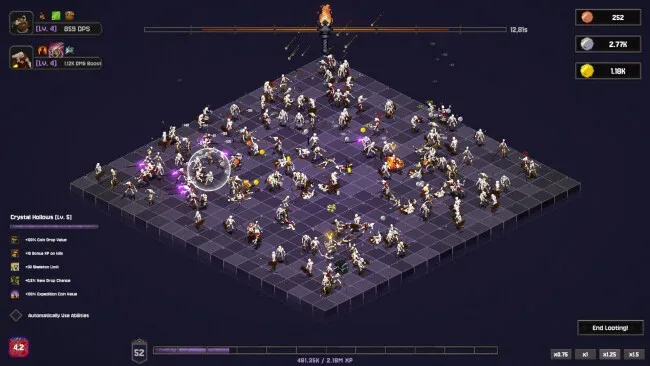
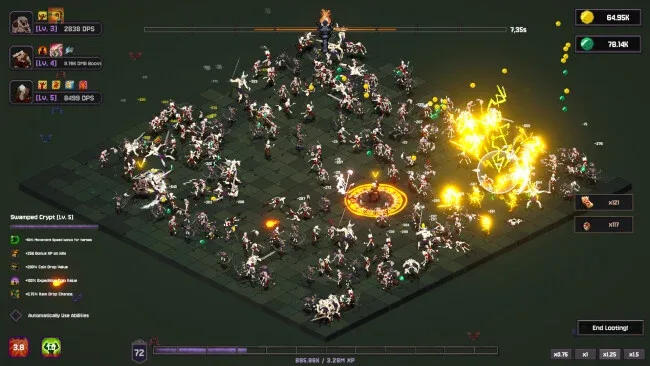
Combat revolves around assembling heroes with different battlefield behaviors, equipping weapons with distinct attack patterns, and sending the party through dungeon chambers packed with skeletal opposition. Defeated enemies drop coins and specialized materials, which feed a clear loop of unlocking upgrades, forging better gear, improving recruits, and returning to tougher rooms for more valuable rewards. The Guild handles recruitment and hero advancement, while the Blacksmith turns collected components into weapons that alter how attacks look and feel in action. A broad skill tree adds long-term momentum, allowing upgrades to strengthen both the player’s overall capabilities and the individual members of the party, while increased party capacity opens more opportunities for complementary combinations.
What separates Bones and Coins from a straightforward loot grinder is its emphasis on synergy rather than merely chasing bigger damage values. Heroes can be enhanced through blessings and developed along separate paths, so the question becomes not just who is strongest, but which group works best with a chosen weapon and dungeon target. Different rooms, enemy types, and item drops give repeated runs a practical purpose, especially for players who enjoy refining builds in games such as Vampire Survivors or lightweight action-RPG clickers. It suits newcomers because its progression loop is easy to read, but dedicated theorycrafters get the most from testing party compositions and squeezing the best returns from every crypt run.
Screenshots
Installation
- Click the green button below to be redirected to UploadHaven.
- Wait 15 seconds, then hit “Free Download.” (Free downloads may be slower — upgrade to UploadHaven Pro for faster speeds.)
- Once downloaded, right-click the .zip file and choose “Extract to Bones and Coins.” (You’ll need 7-Zip for this.)
- Open the extracted folder and run the game as administrator.
- Enjoy! 🎮 If you see missing DLL errors, check the <strong>_Redist</strong> folder inside and install what’s needed.
System Requirements
- OS: Windows 10 or more
- Processor: 2 GHz
- Memory: 4 GB RAM
- Graphics: Intel HD Graphics 5000+
- Storage: 1 GB available space
- Additional Notes: 64 Bit Only
Setup Guide & Troubleshooting
How do I fix missing DLL errors for Bones and Coins (v1.0.1)?
After extracting Bones and Coins (v1.0.1), navigate to the _Redist or _CommonRedist folder inside the game directory and install DirectX, Vcredist, and any other dependencies included.
What should I do if the downloaded file is corrupted?
The full archive is 224.22 MB — make sure your download completed fully before extracting. Use 7-Zip to extract the files. If you still see a "file corrupted" error, re-download and try again.
Why should I run the game as administrator?
Right-click the game executable and select "Run as Administrator" to avoid save file issues and permission errors. This is especially important on the first launch.
How do I update my GPU drivers for this game?
Bones and Coins (v1.0.1) requires a Intel HD Graphics 5000+ or equivalent. Update your NVIDIA or AMD drivers to the latest version for the best performance.
The game won't launch — what should I try?
Try running in compatibility mode, install the latest DirectX runtime, or install the All-in-One VC Redist Package.
My antivirus is blocking the game — is it safe?
Antivirus false positives are common with pre-installed games. Temporarily pause your antivirus during extraction to prevent it from quarantining game files. You can re-enable it after the extraction completes.