
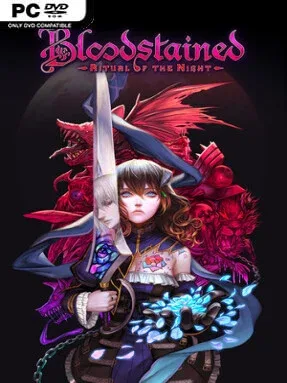
Game Overview
A demon-haunted castle sprawls across a lavish gothic landscape, rewarding every locked door, suspicious wall, and distant platform with a new route or hard-won secret. Bloodstained: Ritual of the Night casts players as Miriam, a Shardbinder whose body slowly turns to crystal after an alchemical curse. Her search for a cure leads to a confrontation with Gebel, a former friend who has summoned an army of demons, giving the adventure a melodramatic dark-fantasy tone that balances tragedy, pulpy horror, and occasional humor.
Miriam fights with an enormous range of weapon types, from whips, swords, guns, and spears to slow, punishing greatblades, while equipping armor, accessories, food bonuses, and magical Shards stolen from enemies. Those Shards act as spells and passive powers: one may summon a familiar, another throws fire, and others improve movement so previously unreachable areas become accessible. The castle gradually unfolds through classic Metroidvania progression, with boss victories, hidden rooms, crafting materials, shops, side quests, and demanding optional encounters encouraging thorough exploration. Difficulty is approachable on the standard setting but can become genuinely testing in later bosses and challenge modes, particularly for players who ignore crafting and shard upgrades.
What separates Bloodstained from many retro-inspired imitators is its sheer density of systems and its clear affection for the Castlevania-style exploration formula associated with producer Koji Igarashi. Its 2.5D presentation sometimes looks less elegant than hand-drawn pixel art, yet the detailed environments, animated enemies, dramatic particle effects, and varied castle districts give the world a strong identity. Multiple playable characters and extra modes, including Boss Rush and speedrunning challenges, add reasons to return after the main campaign, while weapon experimentation makes repeat playthroughs feel meaningfully different. Fans of Castlevania: Symphony of the Night, Hollow Knight, and expansive action RPGs should find plenty to enjoy, and newcomers get a generous, accessible introduction to the genre’s essential loop.
Installation
- Click the green button below to be redirected to UploadHaven.
- Wait 15 seconds, then hit “Free Download.” (Free downloads may be slower — upgrade to UploadHaven Pro for faster speeds.)
- Once downloaded, right-click the .zip file and choose “Extract to Bloodstained: Ritual of the Night.” (You’ll need 7-Zip for this.)
- Open the extracted folder and run the game as administrator.
- Enjoy! 🎮 If you see missing DLL errors, check the <strong>_Redist</strong> folder inside and install what’s needed.
System Requirements
- OS *: Windows 7
- Processor: AMD FX-4350 / Intel Core i5-4460
- Memory: 4 GB RAM
- Graphics: AMD Radeon R9 280X / GeForce GTX 760
- Storage: 10 GB available space
Setup Guide & Troubleshooting
How do I fix missing DLL errors for Bloodstained: Ritual of the Night (v1.6)?
After extracting Bloodstained: Ritual of the Night (v1.6), navigate to the _Redist or _CommonRedist folder inside the game directory and install DirectX, Vcredist, and any other dependencies included.
What should I do if the downloaded file is corrupted?
The full archive is 14.06 GB — make sure your download completed fully before extracting. Use 7-Zip to extract the files. If you still see a "file corrupted" error, re-download and try again.
Why should I run the game as administrator?
Right-click the game executable and select "Run as Administrator" to avoid save file issues and permission errors. This is especially important on the first launch.
How do I update my GPU drivers for this game?
Bloodstained: Ritual of the Night (v1.6) requires a AMD Radeon R9 280X / GeForce GTX 760 or equivalent. Update your NVIDIA or AMD drivers to the latest version for the best performance.
The game won't launch — what should I try?
Try running in compatibility mode, install the latest DirectX runtime, or install the All-in-One VC Redist Package.
My antivirus is blocking the game — is it safe?
Antivirus false positives are common with pre-installed games. Temporarily pause your antivirus during extraction to prevent it from quarantining game files. You can re-enable it after the extraction completes.