
Game Overview
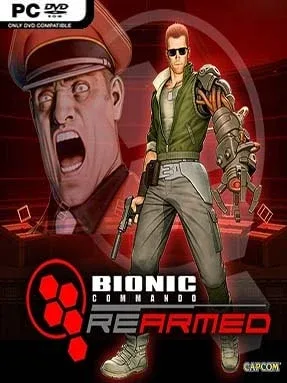
Nathan Spencer’s rescue mission turns an old-school action platformer into a surprisingly demanding test of momentum, aim, and patience. Set behind enemy lines in a militarized sci-fi conflict, Bionic Commando: Rearmed follows the bionic soldier as he searches for captive operative Super Joe while dismantling the Imperial threat. Its defining twist remains brilliant: Spencer cannot jump, so every gap, rooftop, and death trap must be conquered with his telescoping mechanical arm. The result feels like a sharp, arcade-era challenge rebuilt with slick 2.5D scenery, hand-drawn character art, and a remixed score that gives its NES roots real punch.
Progress comes through compact side-scrolling stages packed with soldiers, turrets, destructible objects, hidden items, and huge screen-filling bosses. Players latch onto ceilings and platforms, build a pendulum swing, fire weapons while hanging in midair, and use the arm to grab enemies or pull switches from a distance. Learning to control swing angles is the real combat system, since bad positioning can send Spencer into spikes, water, or a bottomless drop long before an enemy finishes him. Alongside the campaign, obstacle-focused Challenge Rooms push movement mastery, while top-down encounter sections break up the usual platforming; local co-op and competitive multiplayer add alternate ways to enjoy the core mechanics.
Rather than simply coat a retro game in modern graphics, Rearmed preserves the original’s unusual structure while refining its controls, enemy behavior, arsenal, and boss encounters. Its level design often feels closer to a puzzle platformer than a run-and-gun, rewarding players who stop, study anchor points, and plan a clean route instead of rushing forward. The difficulty can be unforgiving, especially in the precision challenges, but checkpoints and repeatable stages keep failures from becoming exhausting. Fans of Contra-style action, the grappling movement of Worms or Umihara Kawase, and demanding retro revivals find plenty to enjoy, while newcomers should arrive ready to unlearn the instinct to jump.
Installation
- Click the green button below to be redirected to UploadHaven.
- Wait 15 seconds, then hit “Free Download.” (Free downloads may be slower — upgrade to UploadHaven Pro for faster speeds.)
- Once downloaded, right-click the .zip file and choose “Extract to Bionic Commando: Rearmed.” (You’ll need 7-Zip for this.)
- Open the extracted folder and run the game as administrator.
- Enjoy! 🎮 If you see missing DLL errors, check the <strong>_Redist</strong> folder inside and install what’s needed.
System Requirements
- Supported OS: Windows® XP Service Pack 2 or Windows Vista™
- Processor: Intel Pentium 4 2 Ghz/AMD XP 2200+
- Memory: 1 GB RAM
- Graphics: 128 MB DirectX 9c compatible card / nVIDIA GeForce 6600 GT / or ATI equivalent
- Sound: DirectX 9 compatible sound card
- DirectX®: DirectX 9c
- Hard Drive: 650 MB free hard drive space
- Peripherals: Keyboard and mouse, Xbox 360 controller supported
Setup Guide & Troubleshooting
How do I fix missing DLL errors for Bionic Commando: Rearmed?
After extracting Bionic Commando: Rearmed, navigate to the _Redist or _CommonRedist folder inside the game directory and install DirectX, Vcredist, and any other dependencies included.
What should I do if the downloaded file is corrupted?
The full archive is 250.92 MB — make sure your download completed fully before extracting. Use 7-Zip to extract the files. If you still see a "file corrupted" error, re-download and try again.
Why should I run the game as administrator?
Right-click the game executable and select "Run as Administrator" to avoid save file issues and permission errors. This is especially important on the first launch.
How do I update my GPU drivers for this game?
Bionic Commando: Rearmed requires a 128 MB DirectX 9c compatible card / nVIDIA GeForce 6600 GT / or ATI equivalent or equivalent. Update your NVIDIA or AMD drivers to the latest version for the best performance.
The game won't launch — what should I try?
Try running in compatibility mode, install the latest DirectX runtime, or install the All-in-One VC Redist Package.
My antivirus is blocking the game — is it safe?
Antivirus false positives are common with pre-installed games. Temporarily pause your antivirus during extraction to prevent it from quarantining game files. You can re-enable it after the extraction completes.