
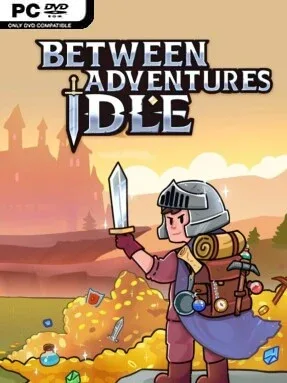
Game Overview
A pixel-art adventurer keeps working even when you are not watching, but the appeal here is more involved than simply waiting for numbers to rise. Between Adventures IDLE combines the long-term planning of an RPG with visible, real-time fights, letting you watch sword swings, arrows, and magic play out against monsters and dungeon bosses. Its tone is relaxed and approachable between battles, then surprisingly tactical when tougher enemies demand smarter preparation. The result is an idle-focused progression game for players who enjoy building a capable character without making endless manual grinding their second job.
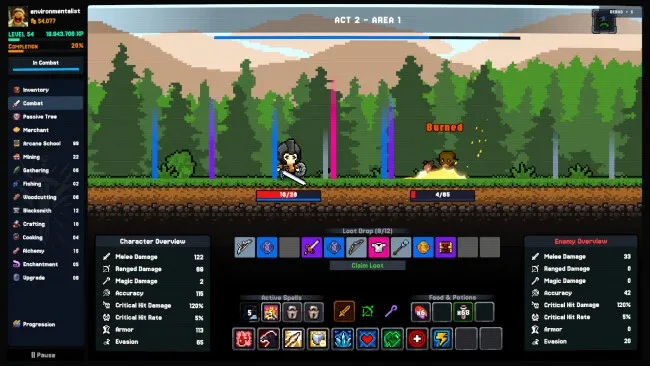
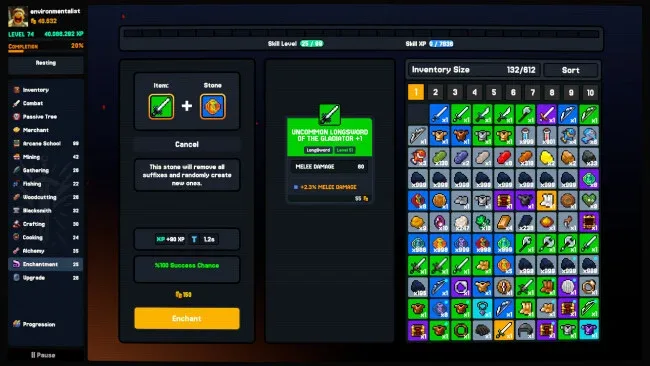
Most of your time revolves around setting jobs, collecting materials, crafting upgrades, and deciding how your hero develops. Eleven skills cover harvesting, fishing, woodcutting, mining, equipment production, cooking, alchemy, enchantment, and arcane training, with gathering and crafting able to run side by side. Combat is not just a scrolling log: enemies visibly attack, while status effects, shields, consumable items, weapon choices, and spell options give difficult encounters a layer of active decision-making. A broad skill tree supports different specializations, whether you want faster resource collection, better loot returns, or combat-focused passive bonuses, while offline advancement ensures chosen tasks continue producing results away from the screen.
What separates Between Adventures IDLE from many genre peers is its effort to make automated progress feel tangible rather than purely menu-driven. Hand-crafted 2D visuals lend the equipment chase and monster fights more personality, while rarity tiers, enchantment stones, merchants, and self-made gear create a satisfying loop of gathering, forging, and improving. The interface is designed to remain readable even as production chains and character options expand, making it accessible to idle newcomers while leaving optimization-minded veterans plenty to tune. Players who like Melvor Idle-style skill growth but want animated combat and a more traditional RPG presentation should find a rewarding, low-pressure grind here.
Screenshots
Installation
- Click the green button below to be redirected to UploadHaven.
- Wait 15 seconds, then hit “Free Download.” (Free downloads may be slower — upgrade to UploadHaven Pro for faster speeds.)
- Once downloaded, right-click the .zip file and choose “Extract to Between Adventures IDLE.” (You’ll need 7-Zip for this.)
- Open the extracted folder and run the game as administrator.
- Enjoy! 🎮 If you see missing DLL errors, check the <strong>_Redist</strong> folder inside and install what’s needed.
System Requirements
- Requires a 64-bit processor and operating system
- OS *: Windows 7 or later
- Processor: Dual-Core 1.8 GHZ or equivalent
- Memory: 1 GB RAM
- Graphics: NVIDIA GeForce 840M (Intergrated Graphics OK)
- Storage: 1 GB available space
- Additional Notes: 64 Bit Only
Setup Guide & Troubleshooting
How do I fix missing DLL errors for Between Adventures IDLE (v0.7.0.5)?
After extracting Between Adventures IDLE (v0.7.0.5), navigate to the _Redist or _CommonRedist folder inside the game directory and install DirectX, Vcredist, and any other dependencies included.
What should I do if the downloaded file is corrupted?
The full archive is 273.66 MB — make sure your download completed fully before extracting. Use 7-Zip to extract the files. If you still see a "file corrupted" error, re-download and try again.
Why should I run the game as administrator?
Right-click the game executable and select "Run as Administrator" to avoid save file issues and permission errors. This is especially important on the first launch.
How do I update my GPU drivers for this game?
Between Adventures IDLE (v0.7.0.5) requires a NVIDIA GeForce 840M (Intergrated Graphics OK) or equivalent. Update your NVIDIA or AMD drivers to the latest version for the best performance.
The game won't launch — what should I try?
Try running in compatibility mode, install the latest DirectX runtime, or install the All-in-One VC Redist Package.
My antivirus is blocking the game — is it safe?
Antivirus false positives are common with pre-installed games. Temporarily pause your antivirus during extraction to prevent it from quarantining game files. You can re-enable it after the extraction completes.