
Game Overview
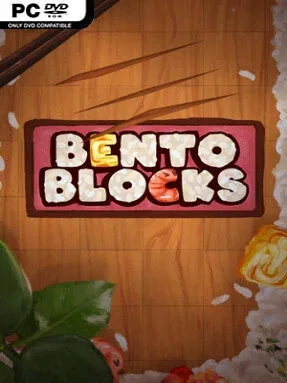
A lunch box becomes a compact little logic problem in this gentle indie puzzler, where every ingredient needs to fit cleanly into a bento tray. The premise is simple: slice food into useful shapes, arrange the pieces inside the box, and waste as few cuts as possible. Its hand-painted presentation, food-themed puzzles, and live-recorded musical backdrop create a warm, unhurried mood rather than the pressure-cooker atmosphere common to score-chasing puzzle games. Bento Blocks turns everyday packing into a surprisingly satisfying exercise in spatial reasoning.
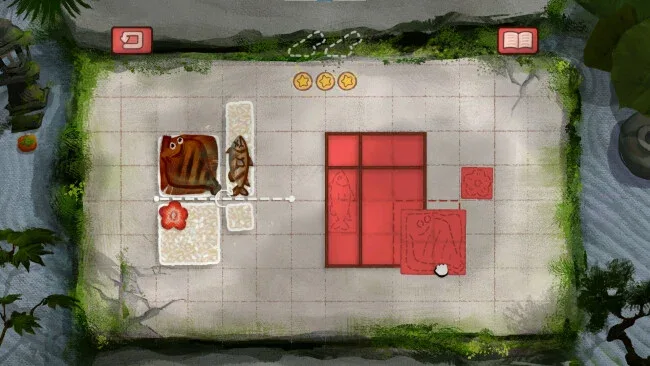
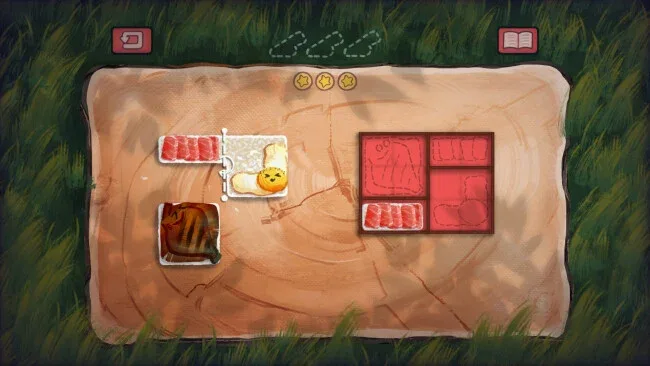
Each level presents a set of ingredients and a container with limited space, asking you to decide where lines should be drawn before committing to a cut. Successful solutions depend on understanding shape, rotation, and available room, while the best results conserve cuts to earn more stars for the recipe collection. More than 180 curated stages steadily introduce stranger box layouts and new puzzle wrinkles, so later challenges demand planning instead of random experimentation. There are no timers forcing snap decisions, letting players test ideas, restart freely, and chase a cleaner three-star solution only when they feel like it.
What makes the format work is its restraint: the game takes a familiar slice-and-fit puzzle concept and wraps it in a tactile culinary theme that makes even geometric problem-solving feel playful. Each bento box has enough personality to prevent the stages from becoming an abstract grid of colored pieces, and unlocked scenic backdrops provide a small but welcome sense of progress beyond the star rating. The difficulty suits casual players at first, yet completionists and genre veterans can find real challenge in minimizing every cut across the full level set. Fans of relaxing spatial puzzlers such as inbento, A Little to the Left, or the calmer moments of mobile logic games should find a smart, cozy palate cleanser here.
Screenshots
Installation
- Select the <strong>Download</strong> button at the top of this page to open UploadHaven.
- On UploadHaven, wait for any countdown, then select <strong>Free Download</strong>. Optional: UploadHaven Pro for faster downloads.
- When complete, extract the archive to a <strong>Bento Blocks</strong> folder using 7-Zip.
- Open the extracted folder and start the game normally.
- For errors, check <strong>Setup Guide & Troubleshooting</strong> below. Keep your security software enabled.
System Requirements
- OS *: Windows 7 (SP1+) and Windows 10
- Processor: 1.8 GHz or faster processor
- Memory: 2 GB RAM
- Graphics: Direct X 11.0 compatible video card
- DirectX: Version 11
- Storage: 300 MB available space
- Sound Card: Any
Setup Guide & Troubleshooting
How do I fix missing DLL errors for Bento Blocks (v2026.05.05)?
After extracting Bento Blocks (v2026.05.05), navigate to the _Redist or _CommonRedist folder inside the game directory and install DirectX, Vcredist, and any other dependencies included.
What should I do if the downloaded file is corrupted?
The full archive is 211.97 MB — make sure your download completed fully before extracting. Use 7-Zip to extract the files. If you still see a "file corrupted" error, re-download and try again.
Why should I run the game as administrator?
Right-click the game executable and select "Run as Administrator" to avoid save file issues and permission errors. This is especially important on the first launch.
How do I update my GPU drivers for this game?
Bento Blocks (v2026.05.05) requires a Direct X 11.0 compatible video card or equivalent. Update your NVIDIA or AMD drivers to the latest version for the best performance.
The game won't launch — what should I try?
This game requires Version 11. Try running in compatibility mode, install the latest DirectX runtime, or install the All-in-One VC Redist Package.
My antivirus is blocking the game — is it safe?
Antivirus false positives are common with pre-installed games. Temporarily pause your antivirus during extraction to prevent it from quarantining game files. You can re-enable it after the extraction completes.