
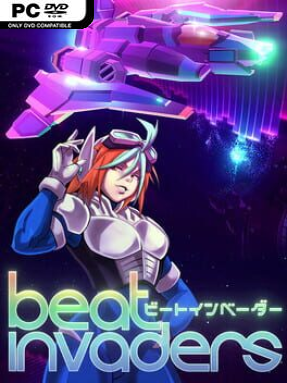
Game Overview
A neon convoy pushes through hostile space while every laser burst, enemy formation, and panic-inducing boss phase moves to the pulse of the soundtrack. Beat Invaders is an arcade roguelite shooter built around the old-school satisfaction of Space Invaders and Galaga, but its rhythm-driven structure gives each run a more volatile personality. You are not simply clearing a screen: freighters need protection, delivery routes need finishing, and enemy waves become more dangerous as the music accelerates. The mood is bright, frantic, and score-chasing, with electronic and vocal tracks turning survival into a tightly timed performance.
Each run has you piloting one of several ship classes, firing through formations, dodging incoming patterns, grabbing boosters, and choosing upgrades between waves. Level-ups let you shape a build around stronger weapons, defensive systems, convoy support, hacks, and powerful specials, while clever combinations can erase an entire screen during the right event. The key twist is that combat speed follows the current song, so opponents fire and reposition according to its tempo rather than a fixed difficulty curve. After a failed or completed delivery, earned points feed permanent upgrades and unlock new ships with distinct primary weapons and stats; those upgrades can also be reset, encouraging experimentation instead of locking players into one strategy.
Event waves and smaller challenges prevent the action from becoming a repetitive march, often creating brief opportunities for spectacular chain reactions and huge score gains. Multiple modes, including easier settings, Hyper Mode, Speedrun, Lone Wolf, rotating daily and weekly challenges, and online leaderboards give dedicated players plenty of reasons to refine routes and builds. Its 33-track soundtrack is more than background flavor, since a song’s pace directly changes how a stage feels and how safely you can react. Beat Invaders suits arcade veterans who miss relentless score attacks, while its upgrade structure and flexible difficulty make it approachable for newcomers who want a faster, more musical take on the roguelite shooter.
Installation
- Click the green button below to be redirected to UploadHaven.
- Wait 15 seconds, then hit “Free Download.” (Free downloads may be slower — upgrade to UploadHaven Pro for faster speeds.)
- Once downloaded, right-click the .zip file and choose “Extract to Beat Invaders.” (You’ll need 7-Zip for this.)
- Open the extracted folder and run the game as administrator.
- Enjoy! 🎮 If you see missing DLL errors, check the <strong>_Redist</strong> folder inside and install what’s needed.
System Requirements
- Requires a 64-bit processor and operating system
- OS: Windows 10
- Processor: 2.6 GHz Dual Core or similar
- Memory: 6 GB RAM
- Graphics: GeForce 700 series or similar
- Storage: 350 MB available space
Setup Guide & Troubleshooting
How do I fix missing DLL errors for Beat Invaders?
After extracting Beat Invaders, navigate to the _Redist or _CommonRedist folder inside the game directory and install DirectX, Vcredist, and any other dependencies included.
What should I do if the downloaded file is corrupted?
The full archive is 273.09 MB — make sure your download completed fully before extracting. Use 7-Zip to extract the files. If you still see a "file corrupted" error, re-download and try again.
Why should I run the game as administrator?
Right-click the game executable and select "Run as Administrator" to avoid save file issues and permission errors. This is especially important on the first launch.
How do I update my GPU drivers for this game?
Beat Invaders requires a GeForce 700 series or similar or equivalent. Update your NVIDIA or AMD drivers to the latest version for the best performance.
The game won't launch — what should I try?
Try running in compatibility mode, install the latest DirectX runtime, or install the All-in-One VC Redist Package.
My antivirus is blocking the game — is it safe?
Antivirus false positives are common with pre-installed games. Temporarily pause your antivirus during extraction to prevent it from quarantining game files. You can re-enable it after the extraction completes.