
Game Overview
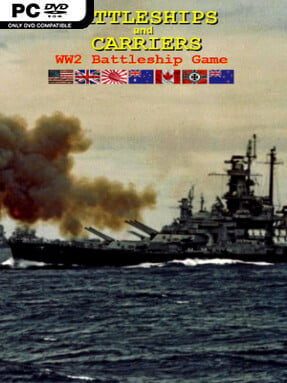
World War II naval warfare becomes a compact, turn-based strategy contest where positioning matters as much as firepower. Battleships and Carriers – WW2 Battleship Game combines the readable, grid-based logic of classic Battleship with a much broader operational layer of fleets, aircraft, submarines, ports, and coastal defenses. Its crisp 2D pixel presentation keeps crowded sea lanes and air operations easy to parse, while the subject matter gives each engagement a suitably tense wartime character. Campaigns and standalone scenarios range from recognizable theatres such as Pearl Harbor, Norway, Normandy, and Leyte to deliberately alternate-history confrontations.
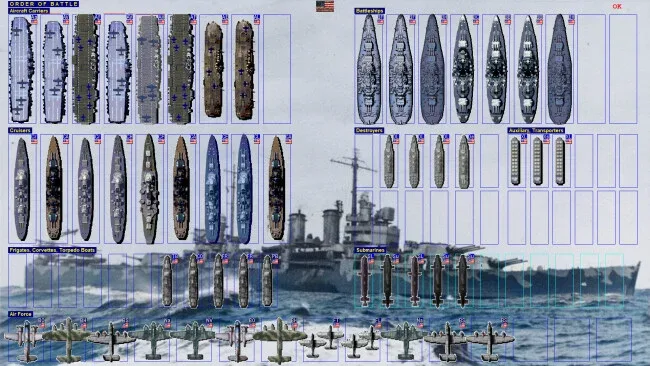
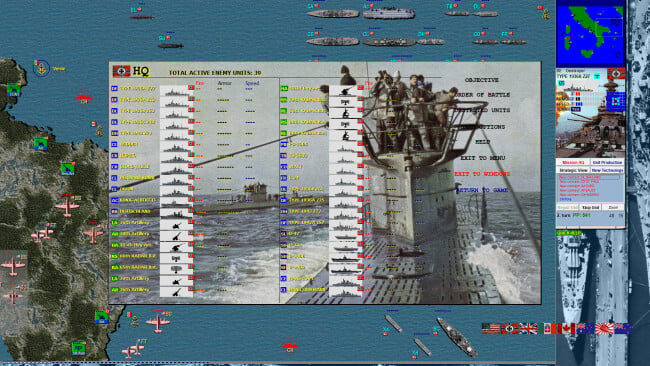
Players move units across maps reaching 80×80 tiles, scout hidden threats, engage enemies, seize ports, protect convoys, or hold strategic positions against attack. Combat is deliberately approachable, but fleet composition creates meaningful choices: destroyers hunt submarines, carriers project aircraft power, radar improves awareness, and heavy ships dominate direct naval exchanges. Production points let you purchase reinforcements during missions and invest in upgrades to armor, speed, firepower, or radar, so successful commanders adapt rather than simply preserve their opening fleet. More than 50 unit categories cover everything from corvettes and torpedo boats to fleet carriers, strategic bombers, submarines, transport vessels, and port artillery, with missions built around conquest, defense, escort, and annihilation objectives.
The strongest appeal lies in the scale packed into its straightforward interface. Rather than simulating every shell trajectory or crew action, it focuses on the satisfying high-level decisions of where to send a task force, when to risk aircraft, and how to defend supply routes. Over 80 missions, four faction-focused campaigns, deathmatches, and Free Hunt scenarios give it considerable value for players who enjoy experimenting with different naval doctrines. Fans of Panzer Corps-style hex-and-counter strategy or simplified naval wargames should find plenty to like, especially if they want historical flavor without the intimidating complexity of a hardcore simulator.
Screenshots
Installation
- Click the green button below to be redirected to UploadHaven.
- Wait 15 seconds, then hit “Free Download.” (Free downloads may be slower — upgrade to UploadHaven Pro for faster speeds.)
- Once downloaded, right-click the .zip file and choose “Extract to Battleships and Carriers - WW2 Battleship Game.” (You’ll need 7-Zip for this.)
- Open the extracted folder and run the game as administrator.
- Enjoy! 🎮 If you see missing DLL errors, check the <strong>_Redist</strong> folder inside and install what’s needed.
System Requirements
- OS *: Windows 7, 8, 10
- Processor: All standard processors will do
- Memory: 1 GB RAM
- Storage: 100 MB available space
- Additional Notes: Optimized for screen resolutions 1920×1080, 1600×900, 1680×1050, 1366×768, 1360×768, 1024×768.
Setup Guide & Troubleshooting
How do I fix missing DLL errors for Battleships and Carriers – WW2 Battleship Game (v1.41)?
After extracting Battleships and Carriers – WW2 Battleship Game (v1.41), navigate to the _Redist or _CommonRedist folder inside the game directory and install DirectX, Vcredist, and any other dependencies included.
What should I do if the downloaded file is corrupted?
The full archive is 110.48 MB — make sure your download completed fully before extracting. Use 7-Zip to extract the files. If you still see a "file corrupted" error, re-download and try again.
Why should I run the game as administrator?
Right-click the game executable and select "Run as Administrator" to avoid save file issues and permission errors. This is especially important on the first launch.
How do I update my GPU drivers for this game?
Update your NVIDIA or AMD drivers to the latest version for the best performance and compatibility.
The game won't launch — what should I try?
Try running in compatibility mode, install the latest DirectX runtime, or install the All-in-One VC Redist Package.
My antivirus is blocking the game — is it safe?
Antivirus false positives are common with pre-installed games. Temporarily pause your antivirus during extraction to prevent it from quarantining game files. You can re-enable it after the extraction completes.