
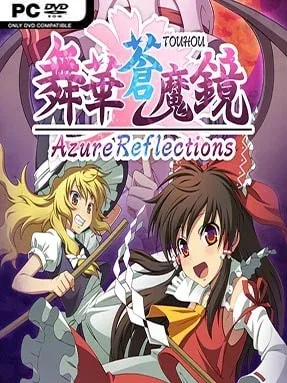
Game Overview
A frantic curtain of glowing projectiles fills the screen as familiar Gensokyo heroines trade spells in a side-scrolling take on Touhou-style shooting. Azure Reflections is an anime bullet hell fangame built around surviving patterns that initially look impossible, then finding the tiny safe routes hidden inside them. Its tone is bright, colourful, and deliberately over-the-top, with bosses unleashing dense danmaku attacks while energetic action keeps every encounter moving. Rather than offering a slow exploratory adventure, it focuses on quick reflexes, visual reading, and the satisfaction of turning panic into precision.
Players steer through horizontal stages, shoot down waves of enemies, collect items, and face boss battles designed around elaborate projectile formations. The key offensive tool is Danmaku Rush, a well-timed burst that lets you cut through hostile fire while damaging opponents, creating an aggressive answer to situations where ordinary dodging is not enough. Success depends on learning attack rhythms, positioning carefully, and knowing when to save or spend that emergency momentum. Tutorial material explains the fundamentals for players unfamiliar with the genre, while Practice Mode lets you repeatedly tackle boss encounters without replaying entire stages, making improvement far less punishing than in many traditional bullet hell shooters.
Its strongest feature is the way it makes bullet hell feel approachable without removing the spectacle that genre veterans want: screens still become packed with hazards, but the game gives players tools to understand and answer the chaos. Collectibles add a lighter layer outside combat, including cosmetic accessories for character customization and unlockable figures viewed in a dedicated gallery. The side-scrolling perspective also distinguishes it from the vertical format most closely associated with Touhou, changing how attacks approach and how players read space. Fans of Touhou, fast arcade shooters, and games such as Mushihimesama will find plenty to enjoy, while newcomers benefit greatly from the training-focused modes.
Installation
- Click the green button below to be redirected to UploadHaven.
- Wait 15 seconds, then hit “Free Download.” (Free downloads may be slower — upgrade to UploadHaven Pro for faster speeds.)
- Once downloaded, right-click the .zip file and choose “Extract to Azure Reflections.” (You’ll need 7-Zip for this.)
- Open the extracted folder and run the game as administrator.
- Enjoy! 🎮 If you see missing DLL errors, check the <strong>_Redist</strong> folder inside and install what’s needed.
System Requirements
- OS: Windows7, Windows10
- Processor: Intel(R) Core(TM) i7-4790
- Memory: 4 GB RAM
- Graphics: NVIDIA GeForce GTX 960
- DirectX: Version 9.0c
Setup Guide & Troubleshooting
How do I fix missing DLL errors for Azure Reflections?
After extracting Azure Reflections, navigate to the _Redist or _CommonRedist folder inside the game directory and install DirectX, Vcredist, and any other dependencies included.
What should I do if the downloaded file is corrupted?
The full archive is 2.54 GB — make sure your download completed fully before extracting. Use 7-Zip to extract the files. If you still see a "file corrupted" error, re-download and try again.
Why should I run the game as administrator?
Right-click the game executable and select "Run as Administrator" to avoid save file issues and permission errors. This is especially important on the first launch.
How do I update my GPU drivers for this game?
Azure Reflections requires a NVIDIA GeForce GTX 960 or equivalent. Update your NVIDIA or AMD drivers to the latest version for the best performance.
The game won't launch — what should I try?
This game requires Version 9.0c. Try running in compatibility mode, install the latest DirectX runtime, or install the All-in-One VC Redist Package.
My antivirus is blocking the game — is it safe?
Antivirus false positives are common with pre-installed games. Temporarily pause your antivirus during extraction to prevent it from quarantining game files. You can re-enable it after the extraction completes.