
Game Overview
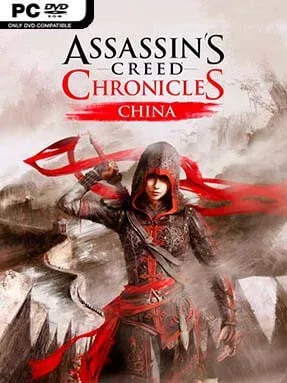
Imperial China becomes a striking side-scrolling battleground where every rooftop, silk curtain, and shadowed corridor can conceal either an escape route or a lethal mistake. Assassin’s Creed Chronicles: China follows Shao Jun, a former concubine turned Assassin, as she returns to a fractured Ming Dynasty after training under Ezio Auditore. Her mission is personal as well as political: the Chinese Brotherhood has been nearly destroyed, and the Templar-backed Eight Tigers control the empire through fear, corruption, and violence. The tone is more focused and theatrical than the open-world series, framing its revenge story like an animated ink-and-watercolor historical drama.
Shao Jun moves through 2.5D levels built around stealth, timing, and careful observation rather than freeform city tourism. Players scout patrol routes, hide behind scenery, use noise-makers and throwing knives to manipulate guards, then slip past danger or eliminate targets with the hidden blade. Levels use multiple depth lanes, allowing Shao Jun to shift between foreground and background paths, evade pursuers, and approach encounters from unexpected angles. Detection is punishing, especially on higher difficulties, so success often comes from preserving cover, managing limited tools, and treating each room as a compact puzzle. Combat exists, but enemies can overwhelm Shao Jun quickly, making clean stealth the more satisfying and reliable route.
Its greatest strength is the translation of Assassin’s Creed ideas into a tightly designed platform-stealth format. Rather than copying the mainline games, Chronicles: China distills parkour, assassination, social concealment, and historical conspiracy into short, replayable missions with optional challenges and score-focused objectives. The hand-painted visual style gives Beijing, the Great Wall, and palace interiors a distinctive identity, while Shao Jun’s acrobatic movement keeps the action brisk. Fans of Mark of the Ninja, Prince of Persia, or the stealthier Assassin’s Creed entries should find plenty to enjoy, particularly if they prefer deliberate infiltration over massive maps.
Installation
- Click the green button below to be redirected to UploadHaven.
- Wait 15 seconds, then hit “Free Download.” (Free downloads may be slower — upgrade to UploadHaven Pro for faster speeds.)
- Once downloaded, right-click the .zip file and choose “Extract to Assassin’s Creed Chronicles: China.” (You’ll need 7-Zip for this.)
- Open the extracted folder and run the game as administrator.
- Enjoy! 🎮 If you see missing DLL errors, check the <strong>_Redist</strong> folder inside and install what’s needed.
System Requirements
- OS: Windows 7 SP1 or Windows 8 or Windows 8.1 (32/64bit versions)
- Processor: Intel Core 2 Duo E8200 @ 2.6 GHz or AMD Athlon II X2 240 @ 2.8 GHz
- Memory: 2 GB RAM
- Graphics: nVidia GeForce GTS450 or AMD Radeon HD5770 (1024MB VRAM with Shader Model 5.0)
- DirectX: Version 10
- Storage: 4 GB available space
- Sound Card: DirectX Compatible Sound Card with latest drivers
- Additional Notes: Video Drivers: nVidia GeForce 347.52 and AMD Catalyst Omega 14.12
Setup Guide & Troubleshooting
How do I fix missing DLL errors for Assassin’s Creed Chronicles: China?
After extracting Assassin’s Creed Chronicles: China, navigate to the _Redist or _CommonRedist folder inside the game directory and install DirectX, Vcredist, and any other dependencies included.
What should I do if the downloaded file is corrupted?
The full archive is 2.97 GB — make sure your download completed fully before extracting. Use 7-Zip to extract the files. If you still see a "file corrupted" error, re-download and try again.
Why should I run the game as administrator?
Right-click the game executable and select "Run as Administrator" to avoid save file issues and permission errors. This is especially important on the first launch.
How do I update my GPU drivers for this game?
Assassin’s Creed Chronicles: China requires a nVidia GeForce GTS450 or AMD Radeon HD5770 (1024MB VRAM with Shader Model 5.0) or equivalent. Update your NVIDIA or AMD drivers to the latest version for the best performance.
The game won't launch — what should I try?
This game requires Version 10. Try running in compatibility mode, install the latest DirectX runtime, or install the All-in-One VC Redist Package.
My antivirus is blocking the game — is it safe?
Antivirus false positives are common with pre-installed games. Temporarily pause your antivirus during extraction to prevent it from quarantining game files. You can re-enable it after the extraction completes.