
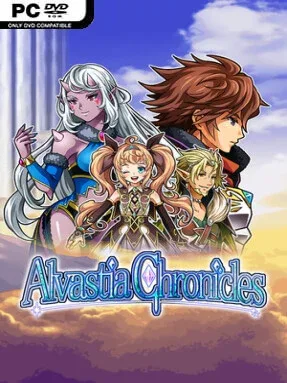
Game Overview
A revenge story quickly grows into a campaign to save an entire realm in this retro-styled Japanese RPG. Elmia and Alan begin by confronting the man tied to their parents’ murder, only to find Alvastia threatened by monsters spilling into the upper world. The tone is earnest and familiar in the best old-school sense: a colorful fantasy adventure built around personal loss, escalating danger, and a steadily expanding band of allies. Alvastia Chronicles leans into the comfort of classic menu-driven RPGs while giving its party system an unusually large scale.
Exploration sends the siblings through towns, dungeons, and story locations while they recruit more than 100 potential companions. Turn-based encounters are the heart of the experience, and battles can place as many as 13 characters on the field at once, making party composition matter far more than in a conventional four-person RPG. Allies develop bonds that unlock useful combat effects, encouraging players to experiment with combinations rather than simply selecting the strongest available fighters. Weapon enhancement provides another avenue for growth, while side quests and a dedicated battle arena offer extra fights, rewards, and reasons to test newly assembled teams.
The huge recruitable cast is the defining feature here, giving the adventure a light collection-game appeal alongside its traditional fantasy narrative. Large parties make encounters visually busy and strategically flexible, even if the presentation remains firmly rooted in the straightforward pixel-art style associated with compact indie RPGs. Players who enjoy Kemco-style adventures, early Dragon Quest pacing, or the character-collecting side of Suikoden-like games will find plenty to work through. It suits newcomers looking for an accessible turn-based RPG, but completion-minded veterans get the most value from chasing every companion, refining bond effects, upgrading gear, and pushing through arena challenges.
Installation
- Click the green button below to be redirected to UploadHaven.
- Wait 15 seconds, then hit “Free Download.” (Free downloads may be slower — upgrade to UploadHaven Pro for faster speeds.)
- Once downloaded, right-click the .zip file and choose “Extract to Alvastia Chronicles.” (You’ll need 7-Zip for this.)
- Open the extracted folder and run the game as administrator.
- Enjoy! 🎮 If you see missing DLL errors, check the <strong>_Redist</strong> folder inside and install what’s needed.
System Requirements
- OS *: Windows 7 and up
- Processor: Intel® Core™ i3
- Memory: 4 GB RAM
- Graphics: 2GB VRAM
- Storage: 670 MB available space
- Additional Notes: This app features keyboard controls and partial controller support with the Xbox One controller. Mouse/touch screen are not supported.
Setup Guide & Troubleshooting
How do I fix missing DLL errors for Alvastia Chronicles?
After extracting Alvastia Chronicles, navigate to the _Redist or _CommonRedist folder inside the game directory and install DirectX, Vcredist, and any other dependencies included.
What should I do if the downloaded file is corrupted?
The full archive is 85.67 MB — make sure your download completed fully before extracting. Use 7-Zip to extract the files. If you still see a "file corrupted" error, re-download and try again.
Why should I run the game as administrator?
Right-click the game executable and select "Run as Administrator" to avoid save file issues and permission errors. This is especially important on the first launch.
How do I update my GPU drivers for this game?
Alvastia Chronicles requires a 2GB VRAM or equivalent. Update your NVIDIA or AMD drivers to the latest version for the best performance.
The game won't launch — what should I try?
Try running in compatibility mode, install the latest DirectX runtime, or install the All-in-One VC Redist Package.
My antivirus is blocking the game — is it safe?
Antivirus false positives are common with pre-installed games. Temporarily pause your antivirus during extraction to prevent it from quarantining game files. You can re-enable it after the extraction completes.