

Game Overview
Running a carrier becomes a demanding numbers game in Airline Founder, a single-player management simulation built around the real pressures of commercial aviation. Rather than simply placing planes on a map, you choose a business identity: budget operator, premium long-haul brand, regional specialist, or full-service network airline. Campaign scenarios based around cities such as Tokyo, Singapore, and Paris give each start different constraints, while the global scale makes expansion feel ambitious rather than abstract. The mood is methodical and business-focused, with success coming from sound planning instead of quick victories.
Daily decision-making revolves around studying demand between cities, checking airport capacity, securing slots, and assigning suitable aircraft to profitable schedules. You buy, lease, or hunt through the used-aircraft market for capacity, then balance utilization against maintenance needs and financial risk. Routes need the right fares, service level, cabin configuration, catering, and frequency; a cheap ticket can fill seats, but a stronger premium product may earn more from fewer passengers. Cash flow, loans, reputation, punctuality, safety, and fleet health all feed into monthly reports, meaning an overconfident expansion can quickly become a debt problem.
Its most appealing feature is the density of its world map, which draws on public aviation data to represent thousands of airports, cities, and established routes. Airport curfews, runway restrictions, noise limits, fees, fuel volatility, and changing travel demand force you to adapt rather than repeat one winning formula forever. A simulated social-media response also gives operational choices visible consequences, as passengers, staff, investors, and aviation enthusiasts react to delays, fares, connections, and incidents. Fans of detailed tycoon games such as Airline Tycoon or the spreadsheet-heavy side of Transport Fever will find the strongest fit here, while newcomers should expect a steep but rewarding learning curve built around aviation economics rather than flashy presentation.
Screenshots
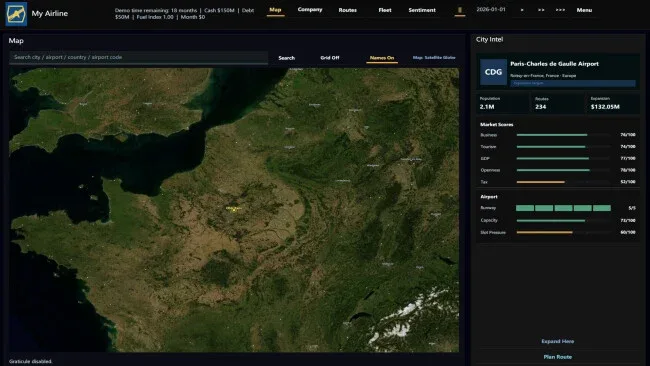
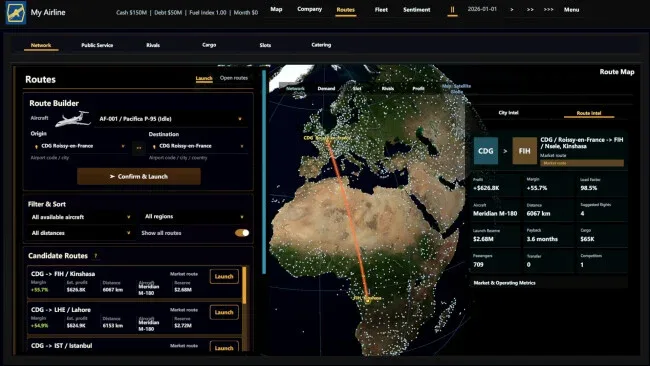
Installation
- Click the green button below to be redirected to UploadHaven.
- Wait 15 seconds, then hit “Free Download.” (Free downloads may be slower — upgrade to UploadHaven Pro for faster speeds.)
- Once downloaded, right-click the .zip file and choose “Extract to Airline Founder.” (You’ll need 7-Zip for this.)
- Open the extracted folder and run the game as administrator.
- Enjoy! 🎮 If you see missing DLL errors, check the <strong>_Redist</strong> folder inside and install what’s needed.
System Requirements
- Requires a 64-bit processor and operating system
- OS: Windows 10 64-bit
- Processor: Intel Core i3-6100 / AMD Ryzen 3 1200 or equivalent
- Memory: 4 GB RAM
- Graphics: DirectX 11 compatible GPU, Intel UHD Graphics 620 / GT 1030 / RX 550 or better
- DirectX: Version 11
- Storage: 2 GB available space
- Sound Card: DirectX compatible sound card
Setup Guide & Troubleshooting
How do I fix missing DLL errors for Airline Founder (v0.5.1)?
After extracting Airline Founder (v0.5.1), navigate to the _Redist or _CommonRedist folder inside the game directory and install DirectX, Vcredist, and any other dependencies included.
What should I do if the downloaded file is corrupted?
The full archive is 417.27 MB — make sure your download completed fully before extracting. Use 7-Zip to extract the files. If you still see a "file corrupted" error, re-download and try again.
Why should I run the game as administrator?
Right-click the game executable and select "Run as Administrator" to avoid save file issues and permission errors. This is especially important on the first launch.
How do I update my GPU drivers for this game?
Airline Founder (v0.5.1) requires a DirectX 11 compatible GPU, Intel UHD Graphics 620 / GT 1030 / RX 550 or better or equivalent. Update your NVIDIA or AMD drivers to the latest version for the best performance.
The game won't launch — what should I try?
This game requires Version 11. Try running in compatibility mode, install the latest DirectX runtime, or install the All-in-One VC Redist Package.
My antivirus is blocking the game — is it safe?
Antivirus false positives are common with pre-installed games. Temporarily pause your antivirus during extraction to prevent it from quarantining game files. You can re-enable it after the extraction completes.