

Game Overview
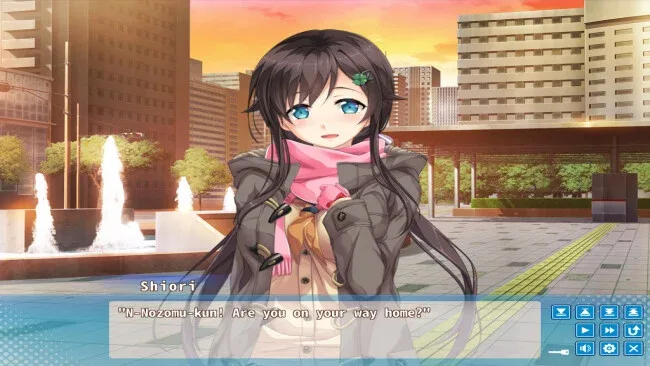
A month of shared meals, household mistakes, and unspoken feelings turns a simple independence lesson into a gentle winter romance. AIKAGI is a linear kinetic visual novel about Nozomu Sunohara, a student pushed by his parents to learn how to live on his own before graduation. Unable to find a suitable apartment and hopelessly unprepared for cooking or domestic life, he accepts an unexpected offer from his childhood friend Shiori Takanashi: move in with her for one month. The mood stays warm, intimate, and lightly comedic, focusing on the small changes that come from two longtime friends suddenly sharing a home.
Reading is the entire experience, with illustrated scenes, character dialogue, and a fixed narrative carrying Nozomu and Shiori from awkward arrangements toward a closer understanding of one another. There are no dialogue choices, route splits, stat systems, or fail states, so it works best as a self-contained story rather than a dating sim built around replaying for different endings. Domestic routines provide the central rhythm: learning to cook, managing daily life, adjusting to another person’s habits, and confronting the emotional uncertainty behind Shiori’s invitation. Progress is measured through the pair’s growing comfort and the gradual revelation of what each of them wants from their time together.
What separates AIKAGI from busier romance visual novels is its commitment to a single relationship and a modest, believable premise instead of dramatic plot twists or a large cast of potential partners. The winter setting and focus on ordinary shared living give it an appealing slice-of-life quality, while the lack of choices keeps the pacing smooth for readers who want to relax with a concise romance. Fans of kinetic novels such as A Winter’s Daydream or the more laid-back portions of Clannad should appreciate its sincere character focus. Players seeking agency, multiple heroines, or complex gameplay should look elsewhere, but newcomers to visual novels and readers wanting a calm childhood-friends romance will find an easy entry point here.
Screenshots

Installation
- Click the green button below to be redirected to UploadHaven.
- Wait 15 seconds, then hit “Free Download.” (Free downloads may be slower — upgrade to UploadHaven Pro for faster speeds.)
- Once downloaded, right-click the .zip file and choose “Extract to AIKAGI.” (You’ll need 7-Zip for this.)
- Open the extracted folder and run the game as administrator.
- Enjoy! 🎮 If you see missing DLL errors, check the <strong>_Redist</strong> folder inside and install what’s needed.
System Requirements
- OS *: Windows 8.1/10
- Processor: Intel Core i series
- Memory: 2 GB RAM
- Graphics: HD Graphics 620, 1024×768
- DirectX: Version 9.0c
- Storage: 3 GB available space
- Sound Card: Support for DirectSound
Setup Guide & Troubleshooting
How do I fix missing DLL errors for AIKAGI (v1.0.0 & R18)?
After extracting AIKAGI (v1.0.0 & R18), navigate to the _Redist or _CommonRedist folder inside the game directory and install DirectX, Vcredist, and any other dependencies included.
What should I do if the downloaded file is corrupted?
The full archive is 3.41 GB — make sure your download completed fully before extracting. Use 7-Zip to extract the files. If you still see a "file corrupted" error, re-download and try again.
Why should I run the game as administrator?
Right-click the game executable and select "Run as Administrator" to avoid save file issues and permission errors. This is especially important on the first launch.
How do I update my GPU drivers for this game?
AIKAGI (v1.0.0 & R18) requires a HD Graphics 620, 1024×768 or equivalent. Update your NVIDIA or AMD drivers to the latest version for the best performance.
The game won't launch — what should I try?
This game requires Version 9.0c. Try running in compatibility mode, install the latest DirectX runtime, or install the All-in-One VC Redist Package.
My antivirus is blocking the game — is it safe?
Antivirus false positives are common with pre-installed games. Temporarily pause your antivirus during extraction to prevent it from quarantining game files. You can re-enable it after the extraction completes.