
Game Overview
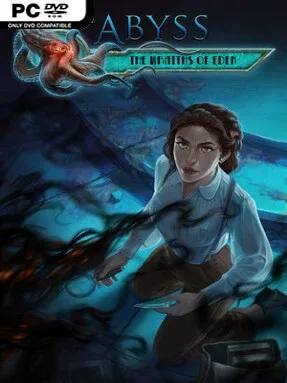
An abandoned Art Deco metropolis beneath the ocean gives this supernatural hidden-object adventure a more evocative setting than most genre peers. Eden’s flooded halls, ornate machinery, and decaying luxury create a mood that sits somewhere between a classic ghost story and a lost-city mystery. The player follows a suspenseful investigation through the ruins, piecing together what destroyed the settlement and why hostile spirits still haunt its corridors. Abyss: The Wraiths of Eden keeps its horror light and accessible rather than relentlessly frightening, leaning on eerie imagery, dramatic discoveries, and a steadily unfolding mystery.
Progress comes from moving between roughly 40 illustrated locations, collecting useful items, solving environmental obstacles, and opening sealed routes deeper into the city. Traditional hidden-object scenes ask you to locate objects in densely detailed screens, while an alternate mode replaces some of those searches with additional puzzles for players who prefer direct interaction. Minigames range from logic challenges and mechanical devices to pattern-based tasks, breaking up the hunt for keys, tools, and clues. The pace remains relaxed and approachable, with adventure-game backtracking kept manageable and puzzles generally designed to maintain momentum rather than stall the story.
Hand-drawn backdrops and polished animated sequences are the major attraction, giving Eden a distinctive drowned-utopia character that feels more ornate than the usual haunted mansion or abandoned asylum. The underwater premise also lets the game build tension through broken glass, darkened passageways, and the sense that the city is permanently cut off from the surface. Its mix of object hunting, inventory puzzles, and short brainteasers makes it a strong fit for fans of Artifex Mundi-style casual adventures and players who enjoy the mystery-solving side of games such as Mystery Case Files. Veterans should expect a concise, familiar hidden-object format, while newcomers get a welcoming introduction with a memorable setting and varied puzzle options.
Installation
- Click the green button below to be redirected to UploadHaven.
- Wait 15 seconds, then hit “Free Download.” (Free downloads may be slower — upgrade to UploadHaven Pro for faster speeds.)
- Once downloaded, right-click the .zip file and choose “Extract to Abyss: The Wraiths of Eden.” (You’ll need 7-Zip for this.)
- Open the extracted folder and run the game as administrator.
- Enjoy! 🎮 If you see missing DLL errors, check the <strong>_Redist</strong> folder inside and install what’s needed.
System Requirements
- OS *: Windows XP, Windows Vista, Windows 7, Windows 8
- Processor: 1.5 GHz
- Memory: 512 MB RAM
- Graphics: 128 MB VRAM
- DirectX: Version 9.0
- Storage: 1 GB available space
Setup Guide & Troubleshooting
How do I fix missing DLL errors for Abyss: The Wraiths of Eden?
After extracting Abyss: The Wraiths of Eden, navigate to the _Redist or _CommonRedist folder inside the game directory and install DirectX, Vcredist, and any other dependencies included.
What should I do if the downloaded file is corrupted?
The full archive is 888.45 MB — make sure your download completed fully before extracting. Use 7-Zip to extract the files. If you still see a "file corrupted" error, re-download and try again.
Why should I run the game as administrator?
Right-click the game executable and select "Run as Administrator" to avoid save file issues and permission errors. This is especially important on the first launch.
How do I update my GPU drivers for this game?
Abyss: The Wraiths of Eden requires a 128 MB VRAM or equivalent. Update your NVIDIA or AMD drivers to the latest version for the best performance.
The game won't launch — what should I try?
This game requires Version 9.0. Try running in compatibility mode, install the latest DirectX runtime, or install the All-in-One VC Redist Package.
My antivirus is blocking the game — is it safe?
Antivirus false positives are common with pre-installed games. Temporarily pause your antivirus during extraction to prevent it from quarantining game files. You can re-enable it after the extraction completes.