
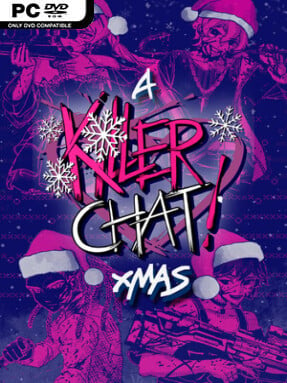
Game Overview
Christmas cheer collides with murder-forum melodrama in this darkly comic visual novel, where a successful author returns to a chat server full of serial killers who still believe their newest friend is one of them. The premise follows the aftermath of an improbably happy romance, trading the original crisis for holiday pressure: finish another story, survive Secret Santa, and keep a relationship with a technically homicidal partner functioning through Christmas dinner. Its tone is gleefully tasteless without becoming bleak, using flirty banter, absurd domestic problems, and a deliberately cheerful festive backdrop to make the violence-adjacent setting funny. Although it works as a standalone episode, familiarity with the earlier story gives its returning cast and relationships more weight.
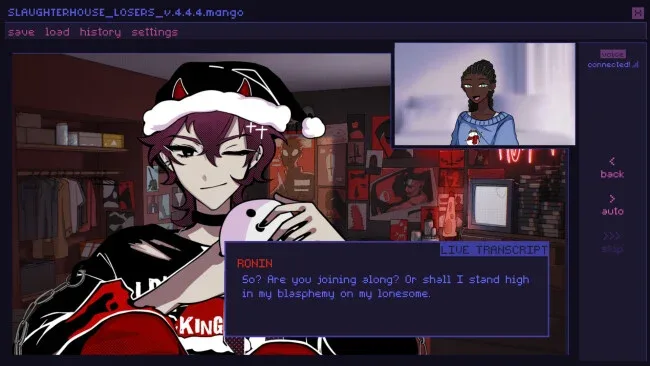
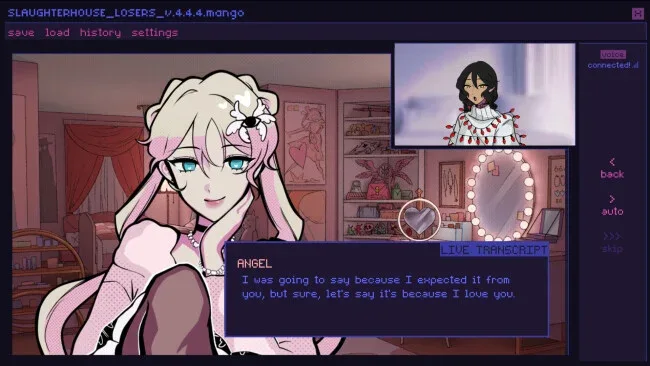
Most of the action unfolds through a simulated messaging interface, where players shape a customizable protagonist’s name, appearance, gender, personality, profile, and responses. Conversations with four possible killer love interests branch according to choices, while calls, group-chat antics, and gift decisions determine how much affection or disapproval the player earns from the wider server. Secret Santa provides the central seasonal hook, with sixteen presents to unlock and several opportunities to meddle in other couples’ gift plans. Each romance route lasts roughly two to three hours, and six endings encourage replaying conversations to see different outcomes, achievements, and character scenes.
What separates it from a typical dating sim is its commitment to the fake online-community format: status updates, bios, and chat messages make the protagonist feel like an active part of the server rather than a passive visual-novel lead. New artwork, illustrated CG scenes, custom music, festive clothing, and time spent with supporting characters broaden the episode beyond a simple romance add-on. The writing is best suited to players who enjoy choice-driven comedy with horror-themed subject matter, profanity, and knowingly uncomfortable jokes rather than genuine mystery or action. Fans of chat-based visual novels such as Emily is Away or grotesque romantic satire will find plenty to like, while newcomers should be comfortable with the premise’s serial-killer humor before logging on.
Screenshots
Installation
- Click the green button below to be redirected to UploadHaven.
- Wait 15 seconds, then hit “Free Download.” (Free downloads may be slower — upgrade to UploadHaven Pro for faster speeds.)
- Once downloaded, right-click the .zip file and choose “Extract to A Killer Chat! Christmas.” (You’ll need 7-Zip for this.)
- Open the extracted folder and run the game as administrator.
- Enjoy! 🎮 If you see missing DLL errors, check the <strong>_Redist</strong> folder inside and install what’s needed.
System Requirements
- OS *: Windows 7 or higher
- Processor: 64-bit Intel-compatible
- Memory: 300 MB RAM
- Graphics: OpenGL 3.0
Setup Guide & Troubleshooting
How do I fix missing DLL errors for A Killer Chat! Christmas?
After extracting A Killer Chat! Christmas, navigate to the _Redist or _CommonRedist folder inside the game directory and install DirectX, Vcredist, and any other dependencies included.
What should I do if the downloaded file is corrupted?
The full archive is 2.63 GB — make sure your download completed fully before extracting. Use 7-Zip to extract the files. If you still see a "file corrupted" error, re-download and try again.
Why should I run the game as administrator?
Right-click the game executable and select "Run as Administrator" to avoid save file issues and permission errors. This is especially important on the first launch.
How do I update my GPU drivers for this game?
A Killer Chat! Christmas requires a OpenGL 3.0 or equivalent. Update your NVIDIA or AMD drivers to the latest version for the best performance.
The game won't launch — what should I try?
Try running in compatibility mode, install the latest DirectX runtime, or install the All-in-One VC Redist Package.
My antivirus is blocking the game — is it safe?
Antivirus false positives are common with pre-installed games. Temporarily pause your antivirus during extraction to prevent it from quarantining game files. You can re-enable it after the extraction completes.