
Game Overview
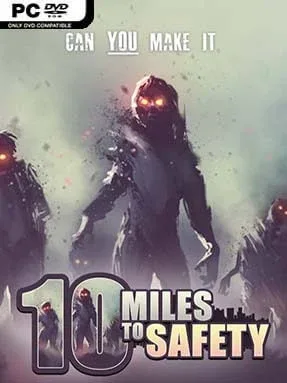
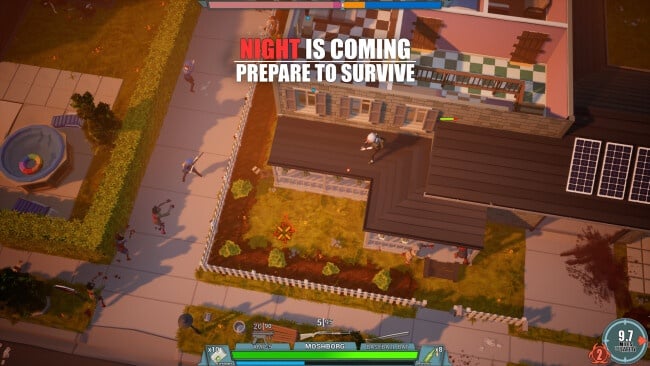
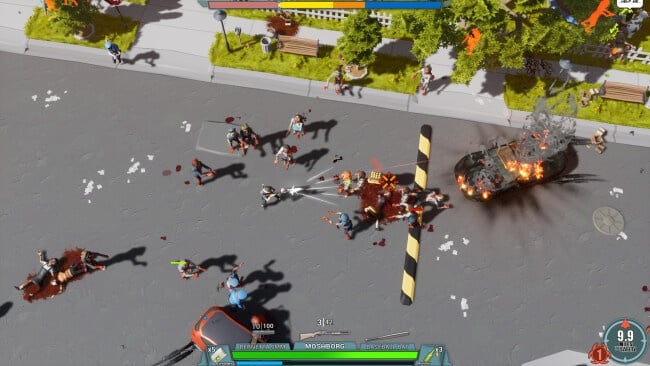
Ten miles sounds manageable until every block is crowded with infected, every abandoned house hides a gamble, and night turns a scavenging run into a desperate retreat. 10 Miles To Safety is an isometric survival action-strategy game built around a simple objective: travel across a hostile, randomly generated apocalypse and reach the rescue point alive. Its tone sits somewhere between tense zombie horror and cooperative sandbox chaos, with improvised defenses, risky looting trips, and sudden swarms constantly disrupting the plan. Whether playing alone or with friends, the journey matters as much as the destination.
Players push steadily toward safety while searching towns, buildings, and wilderness areas for weapons, supplies, and materials. Guns and melee tools help clear immediate threats, but survival also depends on crafting gear, constructing shelters, reinforcing positions, and managing the time spent exposed outside. The infected become more dangerous as the group closes in on the goal, preventing the run from becoming easier simply because progress is being made. Support for one to four players makes teamwork valuable: one survivor can scavenge, another can build, and everyone can scramble back to defend the base when a horde arrives.
Procedural generation gives each attempt a different route, layout, and set of survival problems, making repeated escapes feel less scripted than a conventional campaign. The mix of top-down shooting, base construction, and road-trip survival creates a loop that recalls Project Zomboid’s scavenging tension, while maintaining a lighter, more immediately action-focused structure. Its strongest moments come from the stories that emerge naturally, such as finding a perfect safehouse just before a night attack or losing a well-stocked camp during a poorly planned supply run. Players who enjoy co-op survival games with crafting and emergent mishaps should find plenty to like, while solo players need patience, planning, and a willingness to adapt when the next randomly generated mile goes wrong.
Installation
- Click the green button below to be redirected to UploadHaven.
- Wait 15 seconds, then hit “Free Download.” (Free downloads may be slower — upgrade to UploadHaven Pro for faster speeds.)
- Once downloaded, right-click the .zip file and choose “Extract to 10 Miles To Safety.” (You’ll need 7-Zip for this.)
- Open the extracted folder and run the game as administrator.
- Enjoy! 🎮 If you see missing DLL errors, check the <strong>_Redist</strong> folder inside and install what’s needed.
System Requirements
- OS: Windows 7, Windows 8.1, Windows 10 (64-bit versions only)
- Processor: Intel Core i5 or better / AMD Phenom II X3 or better
- Memory: 8 GB RAM
- Graphics: NVIDIA GeForce GTX 1050 or better / AMD Radeon RX 560 or better
- DirectX: Version 10
- Storage: 2 GB available space
Setup Guide & Troubleshooting
How do I fix missing DLL errors for 10 Miles To Safety (v1.02)?
After extracting 10 Miles To Safety (v1.02), navigate to the _Redist or _CommonRedist folder inside the game directory and install DirectX, Vcredist, and any other dependencies included.
What should I do if the downloaded file is corrupted?
The full archive is 653.81 MB — make sure your download completed fully before extracting. Use 7-Zip to extract the files. If you still see a "file corrupted" error, re-download and try again.
Why should I run the game as administrator?
Right-click the game executable and select "Run as Administrator" to avoid save file issues and permission errors. This is especially important on the first launch.
How do I update my GPU drivers for this game?
10 Miles To Safety (v1.02) requires a NVIDIA GeForce GTX 1050 or better / AMD Radeon RX 560 or better or equivalent. Update your NVIDIA or AMD drivers to the latest version for the best performance.
The game won't launch — what should I try?
This game requires Version 10. Try running in compatibility mode, install the latest DirectX runtime, or install the All-in-One VC Redist Package.
My antivirus is blocking the game — is it safe?
Antivirus false positives are common with pre-installed games. Temporarily pause your antivirus during extraction to prevent it from quarantining game files. You can re-enable it after the extraction completes.